Command bar
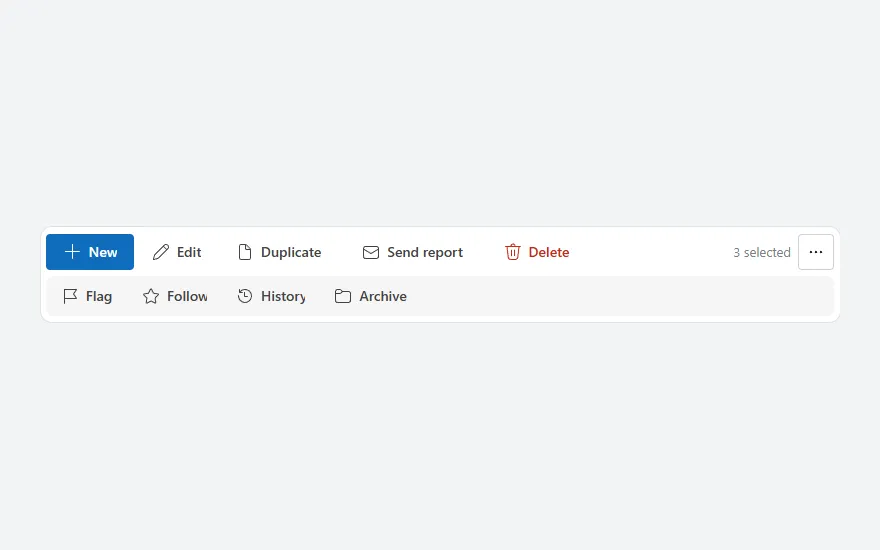
A toolbar of actions with icons, a selection count and a "…" toggle for a second row of less-used actions; labels collapse to icons on narrow screens.
- Version
- 1.0.0
- Updated
- Verified in Studio
- Not yet
- Author
- Ynias Bensch
- Tags
Overview
A command bar in the style of Microsoft 365: one row with a primary New button and the common actions, each with an icon and a label, the number of selected rows on the right, and a "…" button. That button opens a second row with the actions people need less often, and closes it again.
When the bar is narrower than 640 pixels, the buttons drop their labels and show only their icons, with the label as tooltip, so the same bar works on a phone. The second row is part of the bar, so the bar grows when it opens instead of covering the content below.
When to use
- Above a list or a form, for the actions that apply to it or to the selected rows.
- Screens with five to ten actions, of which three or four are used most.
When not to use
- One or two actions: put them in the page header.
- Actions on a single row: use a row action menu.
Controls used
| Control | Version |
|---|---|
| GroupContainer | 1.5.0 |
| ModernButton | 1.0.0 |
| ModernText | 1.0.0 |
YAML
Works as is, with example data inline. Paste it into a screen or container; the steps are underHow to paste.
Not yet verified in Power Apps Studio. The control versions are drafted from documentation. If Studio flags one, see How to paste for the fix.
- CommandBarRoot:
    Control: GroupContainer@1.5.0
    Variant: AutoLayout
    Properties:
      BorderColor: =ColorFade(App.Theme.Colors.Darker70, 88%)
      BorderThickness: =1
      DropShadow: =DropShadow.None
      Fill: =Color.White
      Height: =CommandBarMain.Height + If(CommandBarMore.Visible, CommandBarMore.Height + 4, 0) + 12
      LayoutDirection: =LayoutDirection.Vertical
      LayoutGap: =4
      PaddingBottom: =6
      PaddingLeft: =6
      PaddingRight: =6
      PaddingTop: =6
      RadiusBottomLeft: =12
      RadiusBottomRight: =12
      RadiusTopLeft: =12
      RadiusTopRight: =12
      Width: =Parent.Width
    Children:
      - CommandBarMain:
          Control: GroupContainer@1.5.0
          Variant: AutoLayout
          Properties:
            AlignInContainer: =AlignInContainer.Stretch
            DropShadow: =DropShadow.None
            FillPortions: =0
            Height: =40
            LayoutAlignItems: =LayoutAlignItems.Center
            LayoutDirection: =LayoutDirection.Horizontal
            LayoutGap: =2
            LayoutMinHeight: =40
            LayoutMinWidth: =120
          Children:
            - CommandBarNew:
                Control: ModernButton@1.0.0
                Properties:
                  AccessibleLabel: ="New inspection"
                  Appearance: =ButtonAppearance.Primary
                  Height: =36
                  Icon: ="Add"
                  Layout: =If(CommandBarRoot.Width < 640, ButtonLayout.IconOnly, ButtonLayout.IconBefore)
                  LayoutMinHeight: =36
                  LayoutMinWidth: =36
                  OnSelect: =Notify("New (example only).", NotificationType.Information)
                  Size: =14
                  Text: ="New"
                  Tooltip: ="New inspection"
                  Width: =If(CommandBarRoot.Width < 640, 36, 88)
            - CommandBarEdit:
                Control: ModernButton@1.0.0
                Properties:
                  AccessibleLabel: =Self.Text
                  Appearance: =ButtonAppearance.Subtle
                  Height: =36
                  Icon: ="Edit"
                  Layout: =If(CommandBarRoot.Width < 640, ButtonLayout.IconOnly, ButtonLayout.IconBefore)
                  LayoutMinHeight: =36
                  LayoutMinWidth: =36
                  OnSelect: =Notify("Edit (example only).", NotificationType.Information)
                  Size: =14
                  Text: ="Edit"
                  Tooltip: ="Edit"
                  Width: =If(CommandBarRoot.Width < 640, 36, 80)
            - CommandBarDuplicate:
                Control: ModernButton@1.0.0
                Properties:
                  AccessibleLabel: =Self.Text
                  Appearance: =ButtonAppearance.Subtle
                  Height: =36
                  Icon: ="Document"
                  Layout: =If(CommandBarRoot.Width < 640, ButtonLayout.IconOnly, ButtonLayout.IconBefore)
                  LayoutMinHeight: =36
                  LayoutMinWidth: =36
                  OnSelect: =Notify("Duplicate (example only).", NotificationType.Information)
                  Size: =14
                  Text: ="Duplicate"
                  Tooltip: ="Duplicate"
                  Width: =If(CommandBarRoot.Width < 640, 36, 120)
            - CommandBarSend:
                Control: ModernButton@1.0.0
                Properties:
                  AccessibleLabel: =Self.Text
                  Appearance: =ButtonAppearance.Subtle
                  Height: =36
                  Icon: ="Mail"
                  Layout: =If(CommandBarRoot.Width < 640, ButtonLayout.IconOnly, ButtonLayout.IconBefore)
                  LayoutMinHeight: =36
                  LayoutMinWidth: =36
                  OnSelect: =Notify("Send report (example only).", NotificationType.Information)
                  Size: =14
                  Text: ="Send report"
                  Tooltip: ="Send report"
                  Width: =If(CommandBarRoot.Width < 640, 36, 144)
            - CommandBarDelete:
                Control: ModernButton@1.0.0
                Properties:
                  AccessibleLabel: =Self.Text
                  Appearance: =ButtonAppearance.Subtle
                  Color: =RGBA(196, 43, 28, 1)
                  Height: =36
                  Icon: ="Delete"
                  Layout: =If(CommandBarRoot.Width < 640, ButtonLayout.IconOnly, ButtonLayout.IconBefore)
                  LayoutMinHeight: =36
                  LayoutMinWidth: =36
                  OnSelect: =Notify("Delete (example only).", NotificationType.Warning)
                  Size: =14
                  Text: ="Delete"
                  Tooltip: ="Delete"
                  Width: =If(CommandBarRoot.Width < 640, 36, 100)
            - CommandBarSpacer:
                Control: GroupContainer@1.5.0
                Variant: ManualLayout
                Properties:
                  DropShadow: =DropShadow.None
                  FillPortions: =1
                  Height: =1
                  LayoutMinHeight: =1
                  LayoutMinWidth: =0
            - CommandBarSelection:
                Control: ModernText@1.0.0
                Properties:
                  AccessibleLabel: =Self.Text
                  Align: =Align.Right
                  Color: =ColorFade(App.Theme.Colors.Darker70, 45%)
                  Height: =30
                  LayoutMinHeight: =0
                  LayoutMinWidth: =40
                  Size: =13
                  Text: ="3 selected"
                  Width: =96
                  Wrap: =false
            - CommandBarToggle:
                Control: ModernButton@1.0.0
                Properties:
                  AccessibleLabel: =If(locCommandBarMore, "Fewer actions", "More actions")
                  Appearance: =If(locCommandBarMore, ButtonAppearance.Secondary, ButtonAppearance.Subtle)
                  Height: =36
                  Icon: ="MoreHorizontal"
                  Layout: =ButtonLayout.IconOnly
                  LayoutMinHeight: =36
                  LayoutMinWidth: =36
                  OnSelect: |
                    =UpdateContext({locCommandBarMore: Not(locCommandBarMore)})
                  Size: =14
                  Tooltip: ="More actions"
                  Width: =36
      - CommandBarMore:
          Control: GroupContainer@1.5.0
          Variant: AutoLayout
          Properties:
            AlignInContainer: =AlignInContainer.Stretch
            DropShadow: =DropShadow.None
            Fill: =ColorFade(App.Theme.Colors.Darker70, 96%)
            FillPortions: =0
            Height: =40
            LayoutAlignItems: =LayoutAlignItems.Center
            LayoutDirection: =LayoutDirection.Horizontal
            LayoutGap: =2
            LayoutMinHeight: =40
            LayoutMinWidth: =120
            RadiusBottomLeft: =8
            RadiusBottomRight: =8
            RadiusTopLeft: =8
            RadiusTopRight: =8
            Visible: =locCommandBarMore
          Children:
            - CommandBarFlag:
                Control: ModernButton@1.0.0
                Properties:
                  AccessibleLabel: =Self.Text
                  Appearance: =ButtonAppearance.Subtle
                  Height: =36
                  Icon: ="Flag"
                  LayoutMinHeight: =36
                  LayoutMinWidth: =36
                  OnSelect: =Notify("Flag (example only).", NotificationType.Information)
                  Size: =14
                  Text: ="Flag"
                  Width: =80
            - CommandBarFollow:
                Control: ModernButton@1.0.0
                Properties:
                  AccessibleLabel: =Self.Text
                  Appearance: =ButtonAppearance.Subtle
                  Height: =36
                  Icon: ="Star"
                  LayoutMinHeight: =36
                  LayoutMinWidth: =36
                  OnSelect: =Notify("Follow (example only).", NotificationType.Information)
                  Size: =14
                  Text: ="Follow"
                  Width: =92
            - CommandBarHistory:
                Control: ModernButton@1.0.0
                Properties:
                  AccessibleLabel: =Self.Text
                  Appearance: =ButtonAppearance.Subtle
                  Height: =36
                  Icon: ="History"
                  LayoutMinHeight: =36
                  LayoutMinWidth: =36
                  OnSelect: =Notify("History (example only).", NotificationType.Information)
                  Size: =14
                  Text: ="History"
                  Width: =96
            - CommandBarArchive:
                Control: ModernButton@1.0.0
                Properties:
                  AccessibleLabel: =Self.Text
                  Appearance: =ButtonAppearance.Subtle
                  Height: =36
                  Icon: ="Folder"
                  LayoutMinHeight: =36
                  LayoutMinWidth: =36
                  OnSelect: =Notify("Archive (example only).", NotificationType.Information)
                  Size: =14
                  Text: ="Archive"
                  Width: =100
Make it yours
The example runs on sample data. Replace these properties to connect it to your app.
OnSelect on CommandBarNew
What each button does. Do the same for the other buttons, and change their Text and Icon to your own actions.
In the YAML
OnSelect: =Notify("New (example only).", NotificationType.Information)Your version
OnSelect: =NewForm(InspectionForm); Navigate(InspectionFormScreen, ScreenTransition.None)Text on CommandBarSelection
How many rows are selected in the list the bar acts on, or "" to leave it out.
In the YAML
Text: ="3 selected"Your version
Text: |
  =With({n: CountRows(Filter(InspectionsGallery.AllItems, InspectionsSelect.Checked))}, If(n = 0, "", n & " selected"))
OnSelect on CommandBarDelete
The destructive action, in red. Its red is hard-coded; ask for confirmation first, for example with a confirm dialog.
In the YAML
OnSelect: =Notify("Delete (example only).", NotificationType.Warning)Your version
OnSelect: |
  =UpdateContext({locConfirmDialogOpen: true})
How to paste
- Open your app in Power Apps Studio.
- Check that modern controls are on: Settings → Updates → Modern controls and themes. In newer environments they are on by default.
- Copy the YAML with the Copy button above the code.
- In the Tree view, select the screen or container that should hold the component and press Ctrl+V. The whole component arrives as one container,
CommandBarRoot, with all its controls inside. - Work through Make it yours to swap the example data for your own.
Where your version of Studio has a code view for a control or screen, you can paste the same YAML there instead of into the tree view.
When Studio flags a control version
Each control in the YAML names its version, like Control: ModernButton@1.0.0. If that version is newer than what your environment knows, Studio falls back to the version it has or flags the control. All controls of one type in an app must also use the same version, so an app that already has an older ModernButton can reject the paste. To fix it, insert the same control from the Insert pane, copy it as code, note the version on its Control: line, update every matching line in the YAML and paste again.
Missing a component, or did this one not paste cleanly? Suggest a component or report an issue.