Comment thread
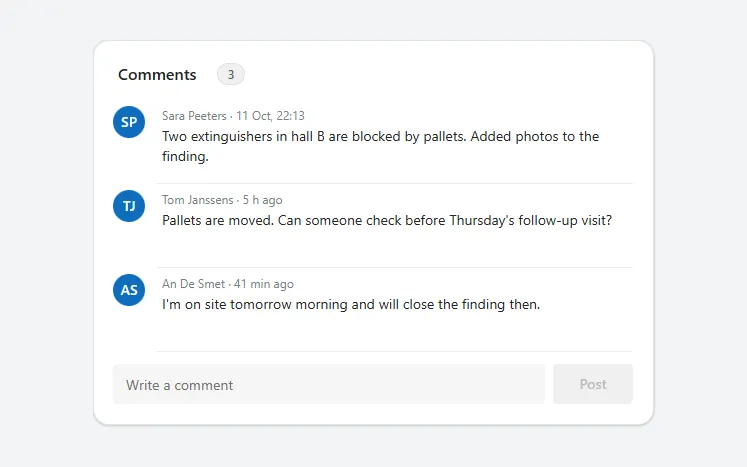
A card of comments with avatars, names, relative times and two-line text, and a field with a Post button underneath.
- Version
- 1.0.0
- Updated
- Verified in Studio
- Not yet
- Author
- Ynias Bensch
- Tags
Overview
A comment thread for discussion on a record: a header with the number of comments, a row per comment with the author's initials, their name and how long ago they wrote, and the comment itself. Under the comments, a text field and a Post button add a new one; Post stays disabled while the field is empty.
Times show as minutes or hours ago for the last day, and as a date after that. Each comment has room for two lines, so the card keeps a steady rhythm; longer comments are cut off, which suits short updates rather than long notes.
When to use
- Short updates and questions on an inspection, a request or a task.
- Up to about ten comments at a time; show the latest ones and link to the rest.
When not to use
- Long notes or reports: use a text area or a document.
- Real-time chat: use Teams.
Controls used
| Control | Version |
|---|---|
| GroupContainer | 1.5.0 |
| ModernText | 1.0.0 |
| ModernBadge | 1.0.0 |
| Gallery | 2.15.0 |
| ModernAvatar | 1.1.0 |
| ModernTextInput | 1.1.2 |
| ModernButton | 1.0.0 |
YAML
Works as is, with example data inline. Paste it into a screen or container; the steps are underHow to paste.
Not yet verified in Power Apps Studio. The control versions are drafted from documentation. If Studio flags one, see How to paste for the fix.
- CommentThreadRoot:
    Control: GroupContainer@1.5.0
    Variant: AutoLayout
    Properties:
      BorderColor: =ColorFade(App.Theme.Colors.Darker70, 88%)
      BorderThickness: =1
      DropShadow: =DropShadow.Light
      Fill: =Color.White
      Height: =CommentThreadHeader.Height + CommentThreadGallery.Height + CommentThreadComposer.Height + 2 * 12 + 40
      LayoutDirection: =LayoutDirection.Vertical
      LayoutGap: =12
      PaddingBottom: =20
      PaddingLeft: =20
      PaddingRight: =20
      PaddingTop: =20
      RadiusBottomLeft: =16
      RadiusBottomRight: =16
      RadiusTopLeft: =16
      RadiusTopRight: =16
      Width: =Min(560, Parent.Width)
    Children:
      - CommentThreadHeader:
          Control: GroupContainer@1.5.0
          Variant: AutoLayout
          Properties:
            AlignInContainer: =AlignInContainer.Stretch
            DropShadow: =DropShadow.None
            FillPortions: =0
            Height: =28
            LayoutAlignItems: =LayoutAlignItems.Center
            LayoutDirection: =LayoutDirection.Horizontal
            LayoutGap: =8
            LayoutMinHeight: =28
            LayoutMinWidth: =120
          Children:
            - CommentThreadTitle:
                Control: ModernText@1.0.0
                Properties:
                  AccessibleLabel: =Self.Text
                  FontWeight: =FontWeight.Semibold
                  Height: =28
                  LayoutMinHeight: =0
                  LayoutMinWidth: =60
                  PaddingBottom: =0
                  PaddingTop: =0
                  Size: =16
                  Text: ="Comments"
                  Width: =96
                  Wrap: =false
            - CommentThreadCount:
                Control: ModernBadge@1.0.0
                Properties:
                  AccessibleLabel: =CommentThreadGallery.AllItemsCount & " comments"
                  Appearance: =BadgeAppearance.Tint
                  Content: =Text(CommentThreadGallery.AllItemsCount)
                  Height: =22
                  Intent: =BadgeIntent.Informative
                  LayoutMinHeight: =22
                  LayoutMinWidth: =28
                  Size: =12
                  Width: =28
      - CommentThreadGallery:
          Control: Gallery@2.15.0
          Variant: Vertical
          Properties:
            AccessibleLabel: ="Comments"
            AlignInContainer: =AlignInContainer.Stretch
            BorderThickness: =0
            FillPortions: =0
            Height: =Self.AllItemsCount * (Self.TemplateHeight + Self.TemplatePadding) + Self.TemplatePadding
            Items: |
              =Table(
                  {Author: "Sara Peeters", When: DateAdd(Now(), -26, TimeUnit.Hours), Text: "Two extinguishers in hall B are blocked by pallets. Added photos to the finding."},
                  {Author: "Tom Janssens", When: DateAdd(Now(), -310, TimeUnit.Minutes), Text: "Pallets are moved. Can someone check before Thursday's follow-up visit?"},
                  {Author: "An De Smet", When: DateAdd(Now(), -40, TimeUnit.Minutes), Text: "I'm on site tomorrow morning and will close the finding then."}
              )
            LayoutMinHeight: =0
            LayoutMinWidth: =120
            ShowScrollbar: =false
            TabIndex: =0
            TemplatePadding: =0
            TemplateSize: =84
          Children:
            - CommentThreadAvatar:
                Control: ModernAvatar@1.1.0
                Properties:
                  AccessibleLabel: =ThisItem.Author
                  Badge: =PresenceBadge.None
                  Height: =32
                  Image: =Blank()
                  Name: =ThisItem.Author
                  Width: =32
                  X: =0
                  Y: =6
            - CommentThreadMeta:
                Control: ModernText@1.0.0
                Properties:
                  AccessibleLabel: =Self.Text
                  Color: =ColorFade(App.Theme.Colors.Darker70, 45%)
                  Height: =22
                  PaddingBottom: =0
                  PaddingTop: =0
                  Size: =12
                  Text: |
                    =ThisItem.Author & " · " & If(
                        DateDiff(ThisItem.When, Now(), TimeUnit.Minutes) < 60, DateDiff(ThisItem.When, Now(), TimeUnit.Minutes) & " min ago",
                        DateDiff(ThisItem.When, Now(), TimeUnit.Hours) < 24, DateDiff(ThisItem.When, Now(), TimeUnit.Hours) & " h ago",
                        Text(ThisItem.When, "d mmm, hh:mm")
                    )
                  Width: =Parent.TemplateWidth - 44
                  Wrap: =false
                  X: =44
                  Y: =4
            - CommentThreadText:
                Control: ModernText@1.0.0
                Properties:
                  AccessibleLabel: =Self.Text
                  Height: =50
                  PaddingBottom: =0
                  PaddingTop: =0
                  Size: =14
                  Text: =ThisItem.Text
                  VerticalAlign: =VerticalAlign.Top
                  Width: =Parent.TemplateWidth - 44
                  X: =44
                  Y: =26
            - CommentThreadDivider:
                Control: GroupContainer@1.5.0
                Variant: ManualLayout
                Properties:
                  DropShadow: =DropShadow.None
                  Fill: =ColorFade(App.Theme.Colors.Darker70, 92%)
                  Height: =1
                  Width: =Parent.TemplateWidth - 44
                  X: =44
                  Y: =Parent.TemplateHeight - 1
      - CommentThreadComposer:
          Control: GroupContainer@1.5.0
          Variant: AutoLayout
          Properties:
            AlignInContainer: =AlignInContainer.Stretch
            DropShadow: =DropShadow.None
            FillPortions: =0
            Height: =40
            LayoutAlignItems: =LayoutAlignItems.Center
            LayoutDirection: =LayoutDirection.Horizontal
            LayoutGap: =8
            LayoutMinHeight: =40
            LayoutMinWidth: =120
          Children:
            - CommentThreadInput:
                Control: ModernTextInput@1.1.2
                Properties:
                  AccessibleLabel: ="Write a comment"
                  FillPortions: =1
                  Height: =40
                  LayoutMinHeight: =40
                  LayoutMinWidth: =120
                  Placeholder: ="Write a comment"
                  Size: =14
            - CommentThreadPost:
                Control: ModernButton@1.0.0
                Properties:
                  AccessibleLabel: =Self.Text
                  Appearance: =ButtonAppearance.Primary
                  DisplayMode: =If(IsBlank(CommentThreadInput.Text), DisplayMode.Disabled, DisplayMode.Edit)
                  Height: =40
                  LayoutMinHeight: =40
                  LayoutMinWidth: =72
                  OnSelect: |
                    =Notify("Comment posted (example only).", NotificationType.Success);
                    Reset(CommentThreadInput)
                  Size: =14
                  Text: ="Post"
                  Width: =80
Make it yours
The example runs on sample data. Replace these properties to connect it to your app.
Items on CommentThreadGallery
The comments, oldest first, each with an Author, a When (date and time) and the Text.
In the YAML
Items: |
  =Table(
      {Author: "Sara Peeters", When: DateAdd(Now(), -26, TimeUnit.Hours), Text: "Two extinguishers in hall B are blocked by pallets. Added photos to the finding."},
      {Author: "Tom Janssens", When: DateAdd(Now(), -310, TimeUnit.Minutes), Text: "Pallets are moved. Can someone check before Thursday's follow-up visit?"},
      {Author: "An De Smet", When: DateAdd(Now(), -40, TimeUnit.Minutes), Text: "I'm on site tomorrow morning and will close the finding then."}
  )
Your version
Items: |
  =ForAll(
      Sort(Filter(Comments, Inspection = varInspection.ID), Created) As c,
      {Author: c.'Created By'.DisplayName, When: c.Created, Text: c.Body}
  )
OnSelect on CommentThreadPost
Save the new comment, then clear the field.
In the YAML
OnSelect: |
  =Notify("Comment posted (example only).", NotificationType.Success);
  Reset(CommentThreadInput)
Your version
OnSelect: |
  =Patch(Comments, Defaults(Comments), {Inspection: varInspection.ID, Body: CommentThreadInput.Text});
  Reset(CommentThreadInput)
How to paste
- Open your app in Power Apps Studio.
- Check that modern controls are on: Settings → Updates → Modern controls and themes. In newer environments they are on by default.
- Copy the YAML with the Copy button above the code.
- In the Tree view, select the screen or container that should hold the component and press Ctrl+V. The whole component arrives as one container,
CommentThreadRoot, with all its controls inside. - Work through Make it yours to swap the example data for your own.
Where your version of Studio has a code view for a control or screen, you can paste the same YAML there instead of into the tree view.
When Studio flags a control version
Each control in the YAML names its version, like Control: ModernButton@1.0.0. If that version is newer than what your environment knows, Studio falls back to the version it has or flags the control. All controls of one type in an app must also use the same version, so an app that already has an older ModernButton can reject the paste. To fix it, insert the same control from the Insert pane, copy it as code, note the version on its Control: line, update every matching line in the YAML and paste again.
Missing a component, or did this one not paste cleanly? Suggest a component or report an issue.