Date range with presets
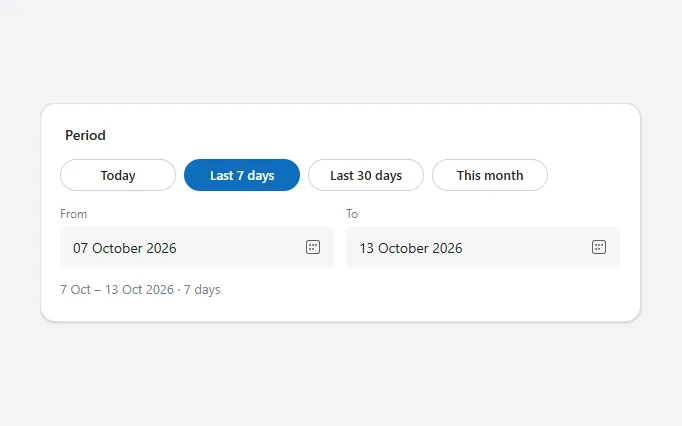
Quick period chips (today, last 7 or 30 days, this month) above From and To date pickers, with a summary of the chosen range in days.
- Version
- 1.0.0
- Updated
- Verified in Studio
- Not yet
- Author
- Ynias Bensch
- Tags
Overview
A date range picker with shortcuts. Most filters use a handful of periods, so pill-shaped chips set both dates in one tap; the chip that matches the current range is filled. For anything else, people pick the dates in the From and To fields, and the To field doesn't allow a date before From.
A summary under the fields repeats the range in words with the number of days. The range lives in locDateRangeFrom and locDateRangeTo and starts at the last seven days; read it from DateRangePresetsFrom.SelectedDate and DateRangePresetsTo.SelectedDate.
When to use
- Filtering lists, reports and dashboards by period.
- Ranges where a few standard periods cover most needs.
When not to use
- A single date: use the date picker.
- Booking or planning with availability: use a calendar.
Before you paste
- Something that uses the range, for example a gallery with
Items: =Filter(Inspections, 'Due date' >= DateRangePresetsFrom.SelectedDate, 'Due date' <= DateRangePresetsTo.SelectedDate).
Controls used
| Control | Version |
|---|---|
| GroupContainer | 1.5.0 |
| ModernText | 1.0.0 |
| Gallery | 2.15.0 |
| ModernButton | 1.0.0 |
| ModernDatePicker | 1.0.2 |
YAML
Works as is, with example data inline. Paste it into a screen or container; the steps are underHow to paste.
Not yet verified in Power Apps Studio. The control versions are drafted from documentation. If Studio flags one, see How to paste for the fix.
- DateRangePresetsRoot:
    Control: GroupContainer@1.5.0
    Variant: AutoLayout
    Properties:
      BorderColor: =ColorFade(App.Theme.Colors.Darker70, 88%)
      BorderThickness: =1
      DropShadow: =DropShadow.Light
      Fill: =Color.White
      Height: =DateRangePresetsTitle.Height + DateRangePresetsChips.Height + DateRangePresetsPickers.Height + DateRangePresetsSummary.Height + 3 * 10 + 40
      LayoutDirection: =LayoutDirection.Vertical
      LayoutGap: =10
      PaddingBottom: =20
      PaddingLeft: =20
      PaddingRight: =20
      PaddingTop: =20
      RadiusBottomLeft: =16
      RadiusBottomRight: =16
      RadiusTopLeft: =16
      RadiusTopRight: =16
      Width: =Min(600, Parent.Width)
    Children:
      - DateRangePresetsTitle:
          Control: ModernText@1.0.0
          Properties:
            AccessibleLabel: =Self.Text
            AlignInContainer: =AlignInContainer.Stretch
            FontWeight: =FontWeight.Semibold
            Height: =24
            LayoutMinHeight: =0
            LayoutMinWidth: =80
            PaddingBottom: =0
            PaddingTop: =0
            Size: =14
            Text: ="Period"
            Wrap: =false
      - DateRangePresetsChips:
          Control: Gallery@2.15.0
          Variant: Horizontal
          Properties:
            AccessibleLabel: ="Quick periods"
            AlignInContainer: =AlignInContainer.Stretch
            BorderThickness: =0
            FillPortions: =0
            Height: =36
            Items: |
              =Table(
                  {Label: "Today", From: Today(), To: Today()},
                  {Label: "Last 7 days", From: Today() - 6, To: Today()},
                  {Label: "Last 30 days", From: Today() - 29, To: Today()},
                  {Label: "This month", From: Date(Year(Today()), Month(Today()), 1), To: Today()}
              )
            LayoutMinHeight: =36
            LayoutMinWidth: =120
            ShowScrollbar: =false
            TabIndex: =0
            TemplatePadding: =0
            TemplateSize: =Min(124, Self.Width / Max(1, Self.AllItemsCount))
          Children:
            - DateRangePresetsChip:
                Control: ModernButton@1.0.0
                Properties:
                  AccessibleLabel: |
                    =ThisItem.Label & If(ThisItem.From = Coalesce(locDateRangeFrom, Today() - 6) && ThisItem.To = Coalesce(locDateRangeTo, Today()), ", selected", "")
                  Appearance: |
                    =If(
                        ThisItem.From = Coalesce(locDateRangeFrom, Today() - 6) && ThisItem.To = Coalesce(locDateRangeTo, Today()),
                        ButtonAppearance.Primary,
                        ButtonAppearance.Secondary
                    )
                  Height: =32
                  OnSelect: |
                    =UpdateContext({locDateRangeFrom: ThisItem.From, locDateRangeTo: ThisItem.To})
                  RadiusBottomLeft: =16
                  RadiusBottomRight: =16
                  RadiusTopLeft: =16
                  RadiusTopRight: =16
                  Size: =13
                  Text: =ThisItem.Label
                  Width: =Parent.TemplateWidth - 8
                  X: =0
                  Y: =2
      - DateRangePresetsPickers:
          Control: GroupContainer@1.5.0
          Variant: AutoLayout
          Properties:
            AlignInContainer: =AlignInContainer.Stretch
            DropShadow: =DropShadow.None
            FillPortions: =0
            Height: =64
            LayoutDirection: =LayoutDirection.Horizontal
            LayoutGap: =12
            LayoutMinHeight: =64
            LayoutMinWidth: =120
          Children:
            - DateRangePresetsFromField:
                Control: GroupContainer@1.5.0
                Variant: AutoLayout
                Properties:
                  DropShadow: =DropShadow.None
                  FillPortions: =1
                  Height: =64
                  LayoutDirection: =LayoutDirection.Vertical
                  LayoutGap: =4
                  LayoutMinHeight: =64
                  LayoutMinWidth: =120
                Children:
                  - DateRangePresetsFromLabel:
                      Control: ModernText@1.0.0
                      Properties:
                        AccessibleLabel: =Self.Text
                        AlignInContainer: =AlignInContainer.Stretch
                        Color: =ColorFade(App.Theme.Colors.Darker70, 45%)
                        Height: =20
                        LayoutMinHeight: =0
                        LayoutMinWidth: =40
                        PaddingBottom: =0
                        PaddingLeft: =0
                        PaddingTop: =0
                        Size: =12
                        Text: ="From"
                        Wrap: =false
                  - DateRangePresetsFrom:
                      Control: ModernDatePicker@1.0.2
                      Properties:
                        AccessibleLabel: ="From date"
                        AlignInContainer: =AlignInContainer.Stretch
                        DefaultDate: =Coalesce(locDateRangeFrom, Today() - 6)
                        Height: =40
                        LayoutMinHeight: =40
                        LayoutMinWidth: =100
                        OnChange: |
                          =UpdateContext({locDateRangeFrom: Self.SelectedDate})
                        Size: =14
                        StartOfWeek: =StartOfWeek.Monday
            - DateRangePresetsToField:
                Control: GroupContainer@1.5.0
                Variant: AutoLayout
                Properties:
                  DropShadow: =DropShadow.None
                  FillPortions: =1
                  Height: =64
                  LayoutDirection: =LayoutDirection.Vertical
                  LayoutGap: =4
                  LayoutMinHeight: =64
                  LayoutMinWidth: =120
                Children:
                  - DateRangePresetsToLabel:
                      Control: ModernText@1.0.0
                      Properties:
                        AccessibleLabel: =Self.Text
                        AlignInContainer: =AlignInContainer.Stretch
                        Color: =ColorFade(App.Theme.Colors.Darker70, 45%)
                        Height: =20
                        LayoutMinHeight: =0
                        LayoutMinWidth: =40
                        PaddingBottom: =0
                        PaddingLeft: =0
                        PaddingTop: =0
                        Size: =12
                        Text: ="To"
                        Wrap: =false
                  - DateRangePresetsTo:
                      Control: ModernDatePicker@1.0.2
                      Properties:
                        AccessibleLabel: ="To date"
                        AlignInContainer: =AlignInContainer.Stretch
                        DefaultDate: =Coalesce(locDateRangeTo, Today())
                        Height: =40
                        LayoutMinHeight: =40
                        LayoutMinWidth: =100
                        OnChange: |
                          =UpdateContext({locDateRangeTo: Self.SelectedDate})
                        Size: =14
                        StartDate: =DateRangePresetsFrom.SelectedDate
                        StartOfWeek: =StartOfWeek.Monday
      - DateRangePresetsSummary:
          Control: ModernText@1.0.0
          Properties:
            AccessibleLabel: =Self.Text
            AlignInContainer: =AlignInContainer.Stretch
            Color: =ColorFade(App.Theme.Colors.Darker70, 45%)
            Height: =24
            LayoutMinHeight: =0
            LayoutMinWidth: =80
            PaddingBottom: =0
            PaddingLeft: =0
            PaddingTop: =0
            Size: =13
            Text: |
              =With(
                  {days: DateDiff(DateRangePresetsFrom.SelectedDate, DateRangePresetsTo.SelectedDate, TimeUnit.Days) + 1},
                  Text(DateRangePresetsFrom.SelectedDate, "d mmm") & " – " & Text(DateRangePresetsTo.SelectedDate, "d mmm yyyy") & " · " & days & If(days = 1, " day", " days")
              )
            Wrap: =false
Make it yours
The example runs on sample data. Replace these properties to connect it to your app.
Items on DateRangePresetsChips
The quick periods, each with a Label, a From and a To date. Four fit next to each other on a phone.
In the YAML
Items: |
  =Table(
      {Label: "Today", From: Today(), To: Today()},
      {Label: "Last 7 days", From: Today() - 6, To: Today()},
      {Label: "Last 30 days", From: Today() - 29, To: Today()},
      {Label: "This month", From: Date(Year(Today()), Month(Today()), 1), To: Today()}
  )
Your version
Items: |
  =Table(
      {Label: "This week", From: Today() - Weekday(Today(), StartOfWeek.Monday) + 1, To: Today()},
      {Label: "Last week", From: Today() - Weekday(Today(), StartOfWeek.Monday) - 6, To: Today() - Weekday(Today(), StartOfWeek.Monday)},
      {Label: "This year", From: Date(Year(Today()), 1, 1), To: Today()}
  )
Text on DateRangePresetsTitle
What the range filters.
In the YAML
Text: ="Period"Your version
Text: ="Inspection date"How to paste
- Open your app in Power Apps Studio.
- Check that modern controls are on: Settings → Updates → Modern controls and themes. In newer environments they are on by default.
- Copy the YAML with the Copy button above the code.
- In the Tree view, select the screen or container that should hold the component and press Ctrl+V. The whole component arrives as one container,
DateRangePresetsRoot, with all its controls inside. - Work through Make it yours to swap the example data for your own.
Where your version of Studio has a code view for a control or screen, you can paste the same YAML there instead of into the tree view.
When Studio flags a control version
Each control in the YAML names its version, like Control: ModernButton@1.0.0. If that version is newer than what your environment knows, Studio falls back to the version it has or flags the control. All controls of one type in an app must also use the same version, so an app that already has an older ModernButton can reject the paste. To fix it, insert the same control from the Insert pane, copy it as code, note the version on its Control: line, update every matching line in the YAML and paste again.
Missing a component, or did this one not paste cleanly? Suggest a component or report an issue.