Filter panel
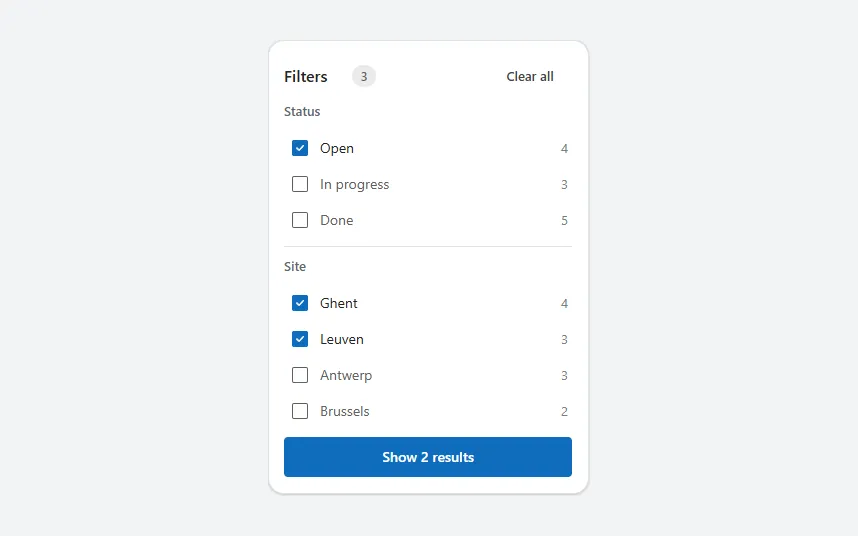
Checkbox groups per field with record counts, an active filter count, Clear all and a button that shows how many results match.
- Version
- 1.0.0
- Updated
- Verified in Studio
- Not yet
- Author
- Ynias Bensch
- Tags
Overview
A filter panel in the style of a web shop. Each field gets a group of checkboxes with the number of records per value, and the header shows how many filters are on and a Clear all button. The button at the bottom counts the records that match and says so, for example "Show 2 results".
Within a group, values add up (Open or In progress); between groups, both must match (Open and in Ghent). The choices are kept as text in locFilterPanelStatus and locFilterPanelSite, so your list can use them. Set the Items of your gallery to:
Filter(
    Inspections,
    (Len(Coalesce(locFilterPanelStatus, "")) <= 1 || ("|" & Status & "|") in locFilterPanelStatus) &&
    (Len(Coalesce(locFilterPanelSite, "")) <= 1 || ("|" & Site & "|") in locFilterPanelSite)
)
When to use
- Lists of a few hundred records with two or three fields people filter on.
- Inside a side panel next to the list, or in a column on wide screens.
When not to use
- Large Dataverse tables:
Distinctand theintest can't be delegated, so filter on a choice column with a dropdown instead. - One field with a few values: use a segmented control or tab bar.
Controls used
| Control | Version |
|---|---|
| GroupContainer | 1.5.0 |
| Gallery | 2.15.0 |
| ModernText | 1.0.0 |
| ModernBadge | 1.0.0 |
| ModernButton | 1.0.0 |
| ModernCheckbox | 1.0.2 |
YAML
Works as is, with example data inline. Paste it into a screen or container; the steps are underHow to paste.
Not yet verified in Power Apps Studio. The control versions are drafted from documentation. If Studio flags one, see How to paste for the fix.
- FilterPanelRoot:
    Control: GroupContainer@1.5.0
    Variant: AutoLayout
    Properties:
      BorderColor: =ColorFade(App.Theme.Colors.Darker70, 88%)
      BorderThickness: =1
      DropShadow: =DropShadow.Light
      Fill: =Color.White
      Height: =FilterPanelHeader.Height + 2 * 22 + FilterPanelStatusList.Height + FilterPanelSiteList.Height + 1 + FilterPanelApply.Height + 6 * 8 + 36
      LayoutDirection: =LayoutDirection.Vertical
      LayoutGap: =8
      PaddingBottom: =16
      PaddingLeft: =16
      PaddingRight: =16
      PaddingTop: =20
      RadiusBottomLeft: =16
      RadiusBottomRight: =16
      RadiusTopLeft: =16
      RadiusTopRight: =16
      Width: =Min(320, Parent.Width)
    Children:
      - FilterPanelSource:
          Control: Gallery@2.15.0
          Variant: Vertical
          Properties:
            AccessibleLabel: ="Records to filter"
            Height: =0
            Items: |
              =Table(
                  {Title: "Fire extinguishers hall B", Status: "Open", Site: "Ghent"},
                  {Title: "Emergency exits", Status: "In progress", Site: "Ghent"},
                  {Title: "Ladder certification", Status: "Open", Site: "Leuven"},
                  {Title: "Electrical panels", Status: "Done", Site: "Antwerp"},
                  {Title: "First aid kits", Status: "Done", Site: "Ghent"},
                  {Title: "Forklift check", Status: "Open", Site: "Antwerp"},
                  {Title: "Racking inspection", Status: "In progress", Site: "Brussels"},
                  {Title: "Fire doors", Status: "Done", Site: "Leuven"},
                  {Title: "Eye wash stations", Status: "Open", Site: "Brussels"},
                  {Title: "Sprinklers", Status: "Done", Site: "Ghent"},
                  {Title: "Gas detection", Status: "In progress", Site: "Antwerp"},
                  {Title: "Fall protection", Status: "Done", Site: "Leuven"}
              )
            LayoutMinHeight: =0
            LayoutMinWidth: =0
            ShowScrollbar: =false
            TabIndex: =0
            Visible: =false
      - FilterPanelHeader:
          Control: GroupContainer@1.5.0
          Variant: AutoLayout
          Properties:
            AlignInContainer: =AlignInContainer.Stretch
            DropShadow: =DropShadow.None
            FillPortions: =0
            Height: =32
            LayoutAlignItems: =LayoutAlignItems.Center
            LayoutDirection: =LayoutDirection.Horizontal
            LayoutGap: =8
            LayoutMinHeight: =32
            LayoutMinWidth: =120
          Children:
            - FilterPanelTitle:
                Control: ModernText@1.0.0
                Properties:
                  AccessibleLabel: =Self.Text
                  FontWeight: =FontWeight.Semibold
                  Height: =28
                  LayoutMinHeight: =0
                  LayoutMinWidth: =40
                  PaddingBottom: =0
                  PaddingLeft: =0
                  PaddingTop: =0
                  Size: =16
                  Text: ="Filters"
                  Width: =60
                  Wrap: =false
            - FilterPanelActive:
                Control: ModernBadge@1.0.0
                Properties:
                  AccessibleLabel: =CountRows(Filter(Split(Coalesce(locFilterPanelStatus, "") & Coalesce(locFilterPanelSite, ""), "|"), Not(IsBlank(Value)))) & " filters active"
                  Appearance: =BadgeAppearance.Filled
                  Content: =Text(CountRows(Filter(Split(Coalesce(locFilterPanelStatus, "") & Coalesce(locFilterPanelSite, ""), "|"), Not(IsBlank(Value)))))
                  Height: =22
                  Intent: =BadgeIntent.Informative
                  LayoutMinHeight: =22
                  LayoutMinWidth: =22
                  Size: =12
                  Visible: =CountRows(Filter(Split(Coalesce(locFilterPanelStatus, "") & Coalesce(locFilterPanelSite, ""), "|"), Not(IsBlank(Value)))) > 0
                  Width: =24
            - FilterPanelSpacer:
                Control: GroupContainer@1.5.0
                Variant: ManualLayout
                Properties:
                  DropShadow: =DropShadow.None
                  FillPortions: =1
                  Height: =1
                  LayoutMinHeight: =1
                  LayoutMinWidth: =0
            - FilterPanelClear:
                Control: ModernButton@1.0.0
                Properties:
                  AccessibleLabel: ="Clear all filters"
                  Appearance: =ButtonAppearance.Subtle
                  DisplayMode: =If(FilterPanelActive.Visible, DisplayMode.Edit, DisplayMode.Disabled)
                  Height: =32
                  LayoutMinHeight: =32
                  LayoutMinWidth: =72
                  OnSelect: |
                    =UpdateContext({locFilterPanelStatus: "", locFilterPanelSite: ""})
                  Size: =13
                  Text: ="Clear all"
                  Width: =84
      - FilterPanelStatusTitle:
          Control: ModernText@1.0.0
          Properties:
            AccessibleLabel: =Self.Text
            AlignInContainer: =AlignInContainer.Stretch
            Color: =ColorFade(App.Theme.Colors.Darker70, 35%)
            FontWeight: =FontWeight.Semibold
            Height: =22
            LayoutMinHeight: =22
            PaddingBottom: =0
            PaddingLeft: =0
            PaddingTop: =0
            Size: =13
            Text: ="Status"
            Wrap: =false
      - FilterPanelStatusList:
          Control: Gallery@2.15.0
          Variant: Vertical
          Properties:
            AccessibleLabel: ="Status filters"
            AlignInContainer: =AlignInContainer.Stretch
            BorderThickness: =0
            FillPortions: =0
            Height: =Self.AllItemsCount * (Self.TemplateHeight + Self.TemplatePadding) + Self.TemplatePadding
            Items: |
              =ForAll(
                  Distinct(FilterPanelSource.AllItems, Status) As d,
                  {Value: d.Value, Count: CountIf(FilterPanelSource.AllItems, Status = d.Value)}
              )
            LayoutMinHeight: =0
            LayoutMinWidth: =120
            ShowScrollbar: =false
            TabIndex: =0
            TemplatePadding: =0
            TemplateSize: =36
          Children:
            - FilterPanelStatusCheck:
                Control: ModernCheckbox@1.0.2
                Properties:
                  AccessibleLabel: =ThisItem.Value & ", " & ThisItem.Count & " records"
                  Default: ="|" & ThisItem.Value & "|" in Coalesce(locFilterPanelStatus, "")
                  Height: =Parent.TemplateHeight
                  Label: =ThisItem.Value
                  OnCheck: |
                    =UpdateContext({locFilterPanelStatus: Coalesce(locFilterPanelStatus, "|") & ThisItem.Value & "|"})
                  OnUncheck: |
                    =UpdateContext({locFilterPanelStatus: Substitute(locFilterPanelStatus, "|" & ThisItem.Value & "|", "|")})
                  Size: =14
                  Width: =Parent.TemplateWidth - 48
                  X: =0
                  Y: =0
            - FilterPanelStatusCount:
                Control: ModernText@1.0.0
                Properties:
                  AccessibleLabel: =Self.Text & " records"
                  Align: =Align.Right
                  Color: =ColorFade(App.Theme.Colors.Darker70, 45%)
                  Height: =Parent.TemplateHeight
                  PaddingBottom: =0
                  PaddingRight: =4
                  PaddingTop: =0
                  Size: =13
                  Text: =ThisItem.Count
                  VerticalAlign: =VerticalAlign.Middle
                  Width: =44
                  Wrap: =false
                  X: =Parent.TemplateWidth - 44
                  Y: =0
      - FilterPanelDivider:
          Control: GroupContainer@1.5.0
          Variant: ManualLayout
          Properties:
            AlignInContainer: =AlignInContainer.Stretch
            DropShadow: =DropShadow.None
            Fill: =ColorFade(App.Theme.Colors.Darker70, 88%)
            FillPortions: =0
            Height: =1
            LayoutMinHeight: =1
            LayoutMinWidth: =0
      - FilterPanelSiteTitle:
          Control: ModernText@1.0.0
          Properties:
            AccessibleLabel: =Self.Text
            AlignInContainer: =AlignInContainer.Stretch
            Color: =ColorFade(App.Theme.Colors.Darker70, 35%)
            FontWeight: =FontWeight.Semibold
            Height: =22
            LayoutMinHeight: =22
            PaddingBottom: =0
            PaddingLeft: =0
            PaddingTop: =0
            Size: =13
            Text: ="Site"
            Wrap: =false
      - FilterPanelSiteList:
          Control: Gallery@2.15.0
          Variant: Vertical
          Properties:
            AccessibleLabel: ="Site filters"
            AlignInContainer: =AlignInContainer.Stretch
            BorderThickness: =0
            FillPortions: =0
            Height: =Self.AllItemsCount * (Self.TemplateHeight + Self.TemplatePadding) + Self.TemplatePadding
            Items: |
              =ForAll(
                  Distinct(FilterPanelSource.AllItems, Site) As d,
                  {Value: d.Value, Count: CountIf(FilterPanelSource.AllItems, Site = d.Value)}
              )
            LayoutMinHeight: =0
            LayoutMinWidth: =120
            ShowScrollbar: =false
            TabIndex: =0
            TemplatePadding: =0
            TemplateSize: =36
          Children:
            - FilterPanelSiteCheck:
                Control: ModernCheckbox@1.0.2
                Properties:
                  AccessibleLabel: =ThisItem.Value & ", " & ThisItem.Count & " records"
                  Default: ="|" & ThisItem.Value & "|" in Coalesce(locFilterPanelSite, "")
                  Height: =Parent.TemplateHeight
                  Label: =ThisItem.Value
                  OnCheck: |
                    =UpdateContext({locFilterPanelSite: Coalesce(locFilterPanelSite, "|") & ThisItem.Value & "|"})
                  OnUncheck: |
                    =UpdateContext({locFilterPanelSite: Substitute(locFilterPanelSite, "|" & ThisItem.Value & "|", "|")})
                  Size: =14
                  Width: =Parent.TemplateWidth - 48
                  X: =0
                  Y: =0
            - FilterPanelSiteCount:
                Control: ModernText@1.0.0
                Properties:
                  AccessibleLabel: =Self.Text & " records"
                  Align: =Align.Right
                  Color: =ColorFade(App.Theme.Colors.Darker70, 45%)
                  Height: =Parent.TemplateHeight
                  PaddingBottom: =0
                  PaddingRight: =4
                  PaddingTop: =0
                  Size: =13
                  Text: =ThisItem.Count
                  VerticalAlign: =VerticalAlign.Middle
                  Width: =44
                  Wrap: =false
                  X: =Parent.TemplateWidth - 44
                  Y: =0
      - FilterPanelApply:
          Control: ModernButton@1.0.0
          Properties:
            AccessibleLabel: =Self.Text
            AlignInContainer: =AlignInContainer.Stretch
            Appearance: =ButtonAppearance.Primary
            Height: =40
            LayoutMinHeight: =40
            LayoutMinWidth: =120
            OnSelect: |
              =Notify("Filters applied (example only).", NotificationType.Success)
            Size: =14
            Text: |
              =With(
                  {
                      n: CountRows(
                          Filter(
                              FilterPanelSource.AllItems,
                              (Len(Coalesce(locFilterPanelStatus, "")) <= 1 || ("|" & Status & "|") in locFilterPanelStatus) &&
                              (Len(Coalesce(locFilterPanelSite, "")) <= 1 || ("|" & Site & "|") in locFilterPanelSite)
                          )
                      )
                  },
                  "Show " & n & If(n = 1, " result", " results")
              )
Make it yours
The example runs on sample data. Replace these properties to connect it to your app.
Items on FilterPanelSource
The records to filter, with a Status and a Site column. To filter on other columns, change Status and Site in the two lists' Items and in the Show button's text.
In the YAML
Items: |
  =Table(
      {Title: "Fire extinguishers hall B", Status: "Open", Site: "Ghent"},
      {Title: "Emergency exits", Status: "In progress", Site: "Ghent"},
      {Title: "Ladder certification", Status: "Open", Site: "Leuven"},
      {Title: "Electrical panels", Status: "Done", Site: "Antwerp"},
      {Title: "First aid kits", Status: "Done", Site: "Ghent"},
      {Title: "Forklift check", Status: "Open", Site: "Antwerp"},
      {Title: "Racking inspection", Status: "In progress", Site: "Brussels"},
      {Title: "Fire doors", Status: "Done", Site: "Leuven"},
      {Title: "Eye wash stations", Status: "Open", Site: "Brussels"},
      {Title: "Sprinklers", Status: "Done", Site: "Ghent"},
      {Title: "Gas detection", Status: "In progress", Site: "Antwerp"},
      {Title: "Fall protection", Status: "Done", Site: "Leuven"}
  )
Your version
Items: =InspectionsOnSelect on FilterPanelApply
What happens after filtering, for example closing the side panel the filters are in.
In the YAML
OnSelect: =Notify("Filters applied (example only).", NotificationType.Success)Your version
OnSelect: |
  =UpdateContext({locSidePanelOpen: false})
How to paste
- Open your app in Power Apps Studio.
- Check that modern controls are on: Settings → Updates → Modern controls and themes. In newer environments they are on by default.
- Copy the YAML with the Copy button above the code.
- In the Tree view, select the screen or container that should hold the component and press Ctrl+V. The whole component arrives as one container,
FilterPanelRoot, with all its controls inside. - Work through Make it yours to swap the example data for your own.
Where your version of Studio has a code view for a control or screen, you can paste the same YAML there instead of into the tree view.
When Studio flags a control version
Each control in the YAML names its version, like Control: ModernButton@1.0.0. If that version is newer than what your environment knows, Studio falls back to the version it has or flags the control. All controls of one type in an app must also use the same version, so an app that already has an older ModernButton can reject the paste. To fix it, insert the same control from the Insert pane, copy it as code, note the version on its Control: line, update every matching line in the YAML and paste again.
Missing a component, or did this one not paste cleanly? Suggest a component or report an issue.