Month calendar
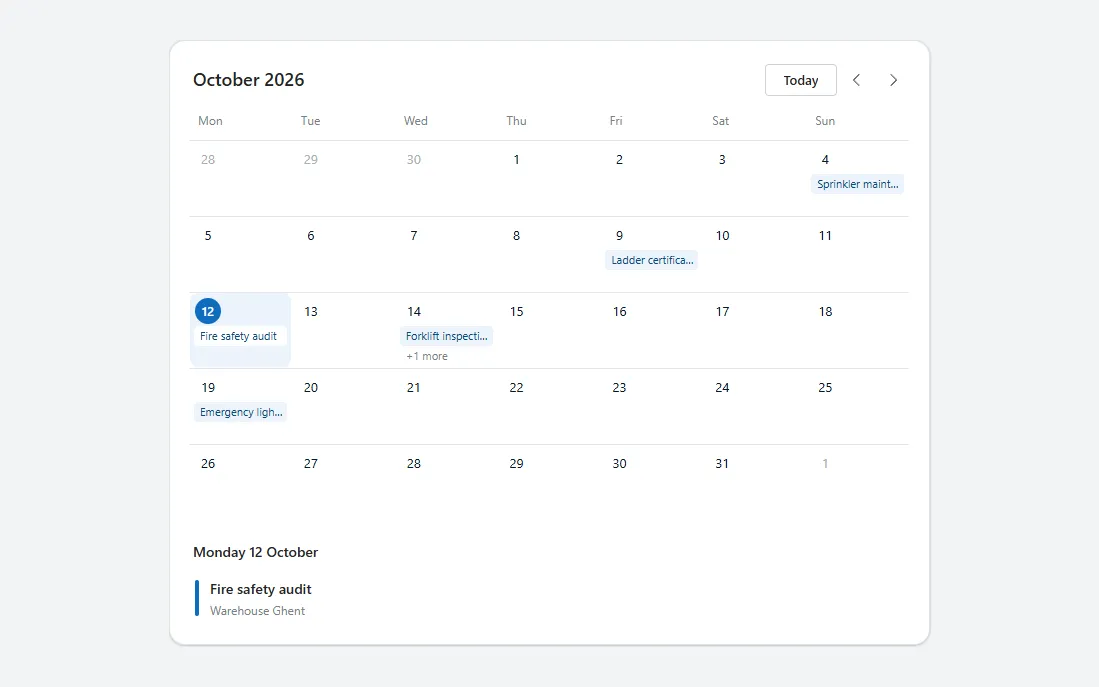
A month grid starting on Monday with today highlighted, event chips per day, previous and next month buttons and an agenda for the selected day.
- Version
- 1.0.0
- Updated
- Verified in Studio
- Not yet
- Author
- Ynias Bensch
- Tags
Overview
A month view for planned work. The grid starts on Monday, greys out the days of the previous and next month, and marks today with a filled circle. Each day shows its first event as a chip in the theme colour, with "+1 more" when there are several. Previous, next and Today buttons change the month.
Selecting a day highlights it and lists its events below the grid, so the calendar works without hover. The grid has five or six rows, depending on the month, and grows to fit; it is at most 760 pixels wide.
When to use
- Planned inspections, visits, shifts or leave, where the date matters more than the time.
- Up to a few events per day.
When not to use
- Many events with start and end times on the same day: use a day or week view, or the Outlook calendar.
- Picking a single date in a form: use the date picker.
Controls used
| Control | Version |
|---|---|
| GroupContainer | 1.5.0 |
| ModernText | 1.0.0 |
| ModernButton | 1.0.0 |
| Gallery | 2.15.0 |
YAML
Works as is, with example data inline. Paste it into a screen or container; the steps are underHow to paste.
Not yet verified in Power Apps Studio. The control versions are drafted from documentation. If Studio flags one, see How to paste for the fix.
- MonthCalendarRoot:
Control: GroupContainer@1.5.0
Variant: AutoLayout
Properties:
BorderColor: =ColorFade(App.Theme.Colors.Darker70, 88%)
BorderThickness: =1
DropShadow: =DropShadow.Light
Fill: =Color.White
Height: =MonthCalendarHeader.Height + MonthCalendarWeekdays.Height + MonthCalendarGrid.Height + MonthCalendarAgendaTitle.Height + If(MonthCalendarAgenda.Visible, MonthCalendarAgenda.Height, MonthCalendarAgendaEmpty.Height) + 4 * 8 + 40
LayoutDirection: =LayoutDirection.Vertical
LayoutGap: =8
PaddingBottom: =20
PaddingLeft: =20
PaddingRight: =20
PaddingTop: =20
RadiusBottomLeft: =16
RadiusBottomRight: =16
RadiusTopLeft: =16
RadiusTopRight: =16
Width: =Min(760, Parent.Width)
Children:
- MonthCalendarHeader:
Control: GroupContainer@1.5.0
Variant: AutoLayout
Properties:
AlignInContainer: =AlignInContainer.Stretch
DropShadow: =DropShadow.None
FillPortions: =0
Height: =40
LayoutAlignItems: =LayoutAlignItems.Center
LayoutDirection: =LayoutDirection.Horizontal
LayoutGap: =4
LayoutMinHeight: =40
LayoutMinWidth: =120
Children:
- MonthCalendarTitle:
Control: ModernText@1.0.0
Properties:
AccessibleLabel: =Self.Text
FillPortions: =1
FontWeight: =FontWeight.Semibold
Height: =30
LayoutMinHeight: =0
LayoutMinWidth: =80
PaddingBottom: =0
PaddingLeft: =4
PaddingTop: =0
Size: =18
Text: =Text(Coalesce(locMonthCalendarMonth, Date(Year(Today()), Month(Today()), 1)), "mmmm yyyy")
Wrap: =false
- MonthCalendarToday:
Control: ModernButton@1.0.0
Properties:
AccessibleLabel: ="Go to today"
Appearance: =ButtonAppearance.Secondary
Height: =32
LayoutMinHeight: =32
LayoutMinWidth: =64
OnSelect: |
=UpdateContext({locMonthCalendarMonth: Date(Year(Today()), Month(Today()), 1), locMonthCalendarSelected: Today()})
Size: =13
Text: ="Today"
Width: =72
- MonthCalendarPrevious:
Control: ModernButton@1.0.0
Properties:
AccessibleLabel: ="Previous month"
Appearance: =ButtonAppearance.Subtle
Height: =32
Icon: ="ChevronRight"
IconRotation: =180
Layout: =ButtonLayout.IconOnly
LayoutMinHeight: =32
LayoutMinWidth: =32
OnSelect: |
=UpdateContext({locMonthCalendarMonth: DateAdd(Coalesce(locMonthCalendarMonth, Date(Year(Today()), Month(Today()), 1)), -1, TimeUnit.Months)})
Size: =14
Tooltip: ="Previous month"
Width: =32
- MonthCalendarNext:
Control: ModernButton@1.0.0
Properties:
AccessibleLabel: ="Next month"
Appearance: =ButtonAppearance.Subtle
Height: =32
Icon: ="ChevronRight"
Layout: =ButtonLayout.IconOnly
LayoutMinHeight: =32
LayoutMinWidth: =32
OnSelect: |
=UpdateContext({locMonthCalendarMonth: DateAdd(Coalesce(locMonthCalendarMonth, Date(Year(Today()), Month(Today()), 1)), 1, TimeUnit.Months)})
Size: =14
Tooltip: ="Next month"
Width: =32
- MonthCalendarWeekdays:
Control: Gallery@2.15.0
Variant: Horizontal
Properties:
AccessibleLabel: ="Days of the week"
AlignInContainer: =AlignInContainer.Stretch
BorderThickness: =0
FillPortions: =0
Height: =24
Items: =["Mon", "Tue", "Wed", "Thu", "Fri", "Sat", "Sun"]
LayoutMinHeight: =0
LayoutMinWidth: =120
ShowScrollbar: =false
TabIndex: =0
TemplatePadding: =0
TemplateSize: =Self.Width / 7
Children:
- MonthCalendarWeekday:
Control: ModernText@1.0.0
Properties:
AccessibleLabel: =Self.Text
Align: =Align.Left
Color: =ColorFade(App.Theme.Colors.Darker70, 45%)
Height: =24
PaddingBottom: =0
PaddingLeft: =9
PaddingTop: =0
Size: =12
Text: =ThisItem.Value
Width: =Parent.TemplateWidth
Wrap: =false
X: =0
Y: =0
- MonthCalendarGrid:
Control: Gallery@2.15.0
Variant: Vertical
Properties:
AccessibleLabel: ="Days of the month"
AlignInContainer: =AlignInContainer.Stretch
BorderThickness: =0
FillPortions: =0
Height: =Self.AllItemsCount / 7 * Self.TemplateHeight
Items: |
=With(
{
month: Coalesce(locMonthCalendarMonth, Date(Year(Today()), Month(Today()), 1)),
events: Table(
{When: Today(), Title: "Fire safety audit", Site: "Warehouse Ghent"},
{When: Today() + 2, Title: "Forklift inspection", Site: "Depot Antwerp"},
{When: Today() + 2, Title: "First aid kit check", Site: "Depot Antwerp"},
{When: Today() - 3, Title: "Ladder certification", Site: "Office Leuven"},
{When: Today() + 7, Title: "Emergency lighting test", Site: "Warehouse Ghent"},
{When: Today() - 8, Title: "Sprinkler maintenance", Site: "Office Leuven"}
)
},
With(
{
start: DateAdd(month, 1 - Weekday(month, StartOfWeek.Monday)),
cells: RoundUp((Weekday(month, StartOfWeek.Monday) - 1 + Day(DateAdd(DateAdd(month, 1, TimeUnit.Months), -1))) / 7, 0) * 7
},
ForAll(
Sequence(cells, 0) As i,
With(
{d: DateAdd(start, i.Value)},
{When: d, InMonth: Month(d) = Month(month), Events: Filter(events, When = d)}
)
)
)
)
LayoutMinHeight: =0
LayoutMinWidth: =120
ShowScrollbar: =false
TabIndex: =0
TemplatePadding: =0
TemplateSize: =76
WrapCount: =7
Children:
- MonthCalendarCell:
Control: GroupContainer@1.5.0
Variant: ManualLayout
Properties:
DropShadow: =DropShadow.None
Fill: =If(ThisItem.When = Coalesce(locMonthCalendarSelected, Today()), App.Theme.Colors.Lighter80, Color.White)
Height: =Parent.TemplateHeight - 2
RadiusBottomLeft: =8
RadiusBottomRight: =8
RadiusTopLeft: =8
RadiusTopRight: =8
Width: =Parent.TemplateWidth - 2
X: =1
Y: =1
- MonthCalendarDivider:
Control: GroupContainer@1.5.0
Variant: ManualLayout
Properties:
DropShadow: =DropShadow.None
Fill: =ColorFade(App.Theme.Colors.Darker70, 90%)
Height: =1
Width: =Parent.TemplateWidth
X: =0
Y: =0
- MonthCalendarDay:
Control: ModernText@1.0.0
Properties:
AccessibleLabel: =Text(ThisItem.When, "dddd d mmmm")
Align: =Align.Center
Color: |
=If(
ThisItem.When = Today(), Color.White,
ThisItem.InMonth, App.Theme.Colors.Darker70,
ColorFade(App.Theme.Colors.Darker70, 65%)
)
Fill: =If(ThisItem.When = Today(), App.Theme.Colors.Primary, Color.Transparent)
FontWeight: =If(ThisItem.When = Today(), FontWeight.Semibold, FontWeight.Normal)
Height: =26
PaddingBottom: =0
PaddingLeft: =0
PaddingRight: =0
PaddingTop: =0
RadiusBottomLeft: =13
RadiusBottomRight: =13
RadiusTopLeft: =13
RadiusTopRight: =13
Size: =13
Text: =Day(ThisItem.When)
Width: =26
Wrap: =false
X: =6
Y: =6
- MonthCalendarEvent:
Control: ModernText@1.0.0
Properties:
AccessibleLabel: =Self.Text
Color: =App.Theme.Colors.Darker30
Fill: =If(ThisItem.When = Coalesce(locMonthCalendarSelected, Today()), Color.White, App.Theme.Colors.Lighter80)
Height: =20
PaddingBottom: =0
PaddingLeft: =6
PaddingRight: =4
PaddingTop: =0
RadiusBottomLeft: =4
RadiusBottomRight: =4
RadiusTopLeft: =4
RadiusTopRight: =4
Size: =11
Text: =First(ThisItem.Events).Title
Visible: =Not(IsEmpty(ThisItem.Events))
Width: =Parent.TemplateWidth - 10
Wrap: =false
X: =5
Y: =34
- MonthCalendarMore:
Control: ModernText@1.0.0
Properties:
AccessibleLabel: =Self.Text
Color: =ColorFade(App.Theme.Colors.Darker70, 45%)
Height: =18
PaddingBottom: =0
PaddingLeft: =6
PaddingTop: =0
Size: =11
Text: ="+" & (CountRows(ThisItem.Events) - 1) & " more"
Visible: =CountRows(ThisItem.Events) > 1
Width: =Parent.TemplateWidth - 10
Wrap: =false
X: =5
Y: =55
- MonthCalendarSelect:
Control: ModernButton@1.0.0
Properties:
AccessibleLabel: =MonthCalendarDay.AccessibleLabel & ", " & CountRows(ThisItem.Events) & " inspections"
Appearance: =ButtonAppearance.Transparent
Height: =Parent.TemplateHeight - 2
OnSelect: |
=UpdateContext({locMonthCalendarSelected: ThisItem.When})
Text: =""
Width: =Parent.TemplateWidth - 2
X: =1
Y: =1
- MonthCalendarAgendaTitle:
Control: ModernText@1.0.0
Properties:
AccessibleLabel: =Self.Text
AlignInContainer: =AlignInContainer.Stretch
FontWeight: =FontWeight.Semibold
Height: =36
LayoutMinHeight: =0
LayoutMinWidth: =80
PaddingBottom: =0
PaddingLeft: =4
PaddingTop: =12
Size: =14
Text: =Text(Coalesce(locMonthCalendarSelected, Today()), "dddd d mmmm")
Wrap: =false
- MonthCalendarAgenda:
Control: Gallery@2.15.0
Variant: Vertical
Properties:
AccessibleLabel: ="Inspections on the selected day"
AlignInContainer: =AlignInContainer.Stretch
BorderThickness: =0
FillPortions: =0
Height: =Self.AllItemsCount * (Self.TemplateHeight + Self.TemplatePadding) + Self.TemplatePadding
Items: =LookUp(MonthCalendarGrid.AllItems, When = Coalesce(locMonthCalendarSelected, Today())).Events
LayoutMinHeight: =0
LayoutMinWidth: =120
ShowScrollbar: =false
TabIndex: =0
TemplatePadding: =2
TemplateSize: =48
Visible: =Self.AllItemsCount > 0
Children:
- MonthCalendarAgendaBar:
Control: GroupContainer@1.5.0
Variant: ManualLayout
Properties:
DropShadow: =DropShadow.None
Fill: =App.Theme.Colors.Primary
Height: =36
RadiusBottomLeft: =2
RadiusBottomRight: =2
RadiusTopLeft: =2
RadiusTopRight: =2
Width: =4
X: =4
Y: =6
- MonthCalendarAgendaItem:
Control: ModernText@1.0.0
Properties:
AccessibleLabel: =Self.Text
FontWeight: =FontWeight.Semibold
Height: =22
PaddingBottom: =0
PaddingTop: =0
Size: =14
Text: =ThisItem.Title
Width: =Parent.TemplateWidth - 20
Wrap: =false
X: =14
Y: =4
- MonthCalendarAgendaSite:
Control: ModernText@1.0.0
Properties:
AccessibleLabel: =Self.Text
Color: =ColorFade(App.Theme.Colors.Darker70, 45%)
Height: =20
PaddingBottom: =0
PaddingTop: =0
Size: =12
Text: =ThisItem.Site
Width: =Parent.TemplateWidth - 20
Wrap: =false
X: =14
Y: =26
- MonthCalendarAgendaEmpty:
Control: ModernText@1.0.0
Properties:
AccessibleLabel: =Self.Text
AlignInContainer: =AlignInContainer.Stretch
Color: =ColorFade(App.Theme.Colors.Darker70, 45%)
Height: =30
LayoutMinHeight: =0
LayoutMinWidth: =80
PaddingBottom: =0
PaddingLeft: =4
PaddingTop: =0
Size: =13
Text: ="No inspections planned"
Visible: =Not(MonthCalendarAgenda.Visible)
Wrap: =falseMake it yours
The example runs on sample data. Replace these properties to connect it to your app.
Items on MonthCalendarGrid
Builds the days of the shown month. Replace only the events table: one record per event with a date in When, a Title and a Site. The filter keeps it to the six weeks on screen.
In the YAML
Items: |
  =With(
      {
          month: Coalesce(locMonthCalendarMonth, Date(Year(Today()), Month(Today()), 1)),
          events: Table(
              {When: Today(), Title: "Fire safety audit", Site: "Warehouse Ghent"},
              {When: Today() + 2, Title: "Forklift inspection", Site: "Depot Antwerp"},
              {When: Today() + 2, Title: "First aid kit check", Site: "Depot Antwerp"},
              {When: Today() - 3, Title: "Ladder certification", Site: "Office Leuven"},
              {When: Today() + 7, Title: "Emergency lighting test", Site: "Warehouse Ghent"},
              {When: Today() - 8, Title: "Sprinkler maintenance", Site: "Office Leuven"}
          )
      },
      With(
          {
              start: DateAdd(month, 1 - Weekday(month, StartOfWeek.Monday)),
              cells: RoundUp((Weekday(month, StartOfWeek.Monday) - 1 + Day(DateAdd(DateAdd(month, 1, TimeUnit.Months), -1))) / 7, 0) * 7
          },
          ForAll(
              Sequence(cells, 0) As i,
              With(
                  {d: DateAdd(start, i.Value)},
                  {When: d, InMonth: Month(d) = Month(month), Events: Filter(events, When = d)}
              )
          )
      )
  )
Your version
Items: |
  =With(
      {
          month: Coalesce(locMonthCalendarMonth, Date(Year(Today()), Month(Today()), 1)),
          events: ForAll(
              Filter(Inspections, 'Planned date' >= Today() - 70, 'Planned date' <= Today() + 70) As e,
              {When: e.'Planned date', Title: e.Title, Site: e.Site}
          )
      },
      With(
          {
              start: DateAdd(month, 1 - Weekday(month, StartOfWeek.Monday)),
              cells: RoundUp((Weekday(month, StartOfWeek.Monday) - 1 + Day(DateAdd(DateAdd(month, 1, TimeUnit.Months), -1))) / 7, 0) * 7
          },
          ForAll(
              Sequence(cells, 0) As i,
              With(
                  {d: DateAdd(start, i.Value)},
                  {When: d, InMonth: Month(d) = Month(month), Events: Filter(events, When = d)}
              )
          )
      )
  )
OnSelect on MonthCalendarSelect
What selecting a day does. It fills the agenda below the grid; you can also open a form for a new event on that day.
In the YAML
OnSelect: |
  =UpdateContext({locMonthCalendarSelected: ThisItem.When})
Your version
OnSelect: |
  =UpdateContext({locMonthCalendarSelected: ThisItem.When});
  If(IsEmpty(ThisItem.Events), Set(varNewDate, ThisItem.When))
How to paste
- Open your app in Power Apps Studio.
- Check that modern controls are on: Settings → Updates → Modern controls and themes. In newer environments they are on by default.
- Copy the YAML with the Copy button above the code.
- In the Tree view, select the screen or container that should hold the component and press Ctrl+V. The whole component arrives as one container,
MonthCalendarRoot, with all its controls inside. - Work through Make it yours to swap the example data for your own.
Where your version of Studio has a code view for a control or screen, you can paste the same YAML there instead of into the tree view.
When Studio flags a control version
Each control in the YAML names its version, like Control: ModernButton@1.0.0. If that version is newer than what your environment knows, Studio falls back to the version it has or flags the control. All controls of one type in an app must also use the same version, so an app that already has an older ModernButton can reject the paste. To fix it, insert the same control from the Insert pane, copy it as code, note the version on its Control: line, update every matching line in the YAML and paste again.
Missing a component, or did this one not paste cleanly? Suggest a component or report an issue.