SLA countdown
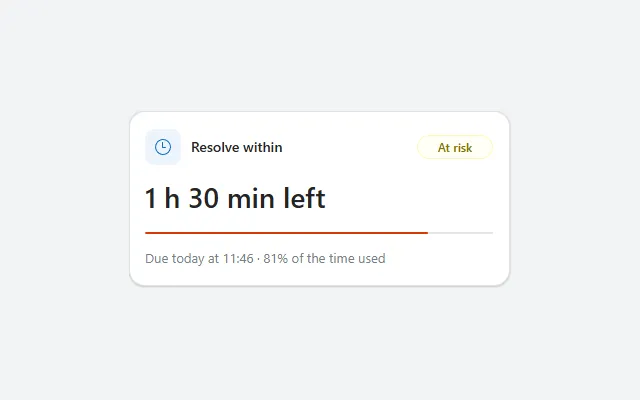
Time left until a deadline, with a progress bar of the time used and a badge that turns from On track to At risk to Breached.
- Version
- 1.0.0
- Updated
- Verified in Studio
- Not yet
- Author
- Ynias Bensch
- Tags
Overview
A countdown for tickets, requests and inspections with a deadline. The large number says how much time is left, in days, hours or minutes, or how long the deadline has passed. A progress bar shows how much of the time between start and deadline is used, and a badge says On track, At risk or Breached in green, amber or red.
A hidden timer refreshes the countdown every minute, so it keeps up while the screen is open. The thresholds live in one hidden text, SlaCountdownState, that the badge and the bar read.
When to use
- The details screen of a request or ticket with a response or resolution time.
- A dashboard tile for the next deadline.
When not to use
- Lists of many deadlines: show a due date column with a coloured badge per row instead.
- Deadlines in weeks or months, where a date is clearer than a countdown.
Controls used
| Control | Version |
|---|---|
| GroupContainer | 1.5.0 |
| Gallery | 2.15.0 |
| Timer | 2.1.0 |
| ModernText | 1.0.0 |
| ModernIcon | 1.1.1 |
| ModernBadge | 1.0.0 |
| ModernProgressBar | 1.0.0 |
YAML
Works as is, with example data inline. Paste it into a screen or container; the steps are underHow to paste.
Not yet verified in Power Apps Studio. The control versions are drafted from documentation. If Studio flags one, see How to paste for the fix.
- SlaCountdownRoot:
    Control: GroupContainer@1.5.0
    Variant: AutoLayout
    Properties:
      BorderColor: =ColorFade(App.Theme.Colors.Darker70, 88%)
      BorderThickness: =1
      DropShadow: =DropShadow.Light
      Fill: =Color.White
      Height: =40 + 44 + 12 + 22 + 3 * 8 + 32
      LayoutDirection: =LayoutDirection.Vertical
      LayoutGap: =8
      PaddingBottom: =16
      PaddingLeft: =16
      PaddingRight: =16
      PaddingTop: =16
      RadiusBottomLeft: =16
      RadiusBottomRight: =16
      RadiusTopLeft: =16
      RadiusTopRight: =16
      Width: =Min(380, Parent.Width)
    Children:
      - SlaCountdownSource:
          Control: Gallery@2.15.0
          Variant: Vertical
          Properties:
            AccessibleLabel: ="Deadline"
            Height: =0
            Items: |
              =Table({Opened: DateAdd(Now(), -390, TimeUnit.Minutes), Due: DateAdd(Now(), 90, TimeUnit.Minutes)})
            LayoutMinHeight: =0
            LayoutMinWidth: =0
            ShowScrollbar: =false
            TabIndex: =0
            Visible: =false
      - SlaCountdownTimer:
          Control: Timer@2.1.0
          Properties:
            AutoStart: =true
            Duration: =60000
            OnTimerEnd: |
              =UpdateContext({locSlaCountdownNow: Now()})
            Repeat: =true
            Visible: =false
      - SlaCountdownState:
          Control: ModernText@1.0.0
          Properties:
            AccessibleLabel: =Self.Text
            Height: =0
            LayoutMinHeight: =0
            Text: |
              =With(
                  {s: First(SlaCountdownSource.AllItems), now: Coalesce(locSlaCountdownNow, Now())},
                  With(
                      {left: DateDiff(now, s.Due, TimeUnit.Minutes), total: Max(1, DateDiff(s.Opened, s.Due, TimeUnit.Minutes))},
                      If(left <= 0, "Breached", (total - left) / total >= 0.75, "At risk", "On track")
                  )
              )
            Visible: =false
      - SlaCountdownHeader:
          Control: GroupContainer@1.5.0
          Variant: AutoLayout
          Properties:
            AlignInContainer: =AlignInContainer.Stretch
            DropShadow: =DropShadow.None
            FillPortions: =0
            Height: =40
            LayoutAlignItems: =LayoutAlignItems.Center
            LayoutDirection: =LayoutDirection.Horizontal
            LayoutGap: =10
            LayoutMinHeight: =40
            LayoutMinWidth: =120
          Children:
            - SlaCountdownIcon:
                Control: ModernIcon@1.1.1
                Properties:
                  AccessibleLabel: ="Deadline"
                  Fill: =App.Theme.Colors.Lighter80
                  Height: =36
                  Icon: ="Clock"
                  IconColor: =App.Theme.Colors.Primary
                  LayoutMinHeight: =36
                  LayoutMinWidth: =36
                  PaddingBottom: =8
                  PaddingLeft: =8
                  PaddingRight: =8
                  PaddingTop: =8
                  RadiusBottomLeft: =10
                  RadiusBottomRight: =10
                  RadiusTopLeft: =10
                  RadiusTopRight: =10
                  Width: =36
            - SlaCountdownTitle:
                Control: ModernText@1.0.0
                Properties:
                  AccessibleLabel: =Self.Text
                  FillPortions: =1
                  FontWeight: =FontWeight.Semibold
                  Height: =30
                  LayoutMinHeight: =30
                  LayoutMinWidth: =80
                  PaddingBottom: =0
                  PaddingLeft: =0
                  PaddingTop: =0
                  Size: =14
                  Text: ="Resolve within"
                  Wrap: =false
            - SlaCountdownBadge:
                Control: ModernBadge@1.0.0
                Properties:
                  AccessibleLabel: |
                    ="Status: " & SlaCountdownState.Text
                  Appearance: =BadgeAppearance.Tint
                  Content: =SlaCountdownState.Text
                  Height: =24
                  Intent: =Switch(SlaCountdownState.Text, "Breached", BadgeIntent.Critical, "At risk", BadgeIntent.Caution, BadgeIntent.Positive)
                  LayoutMinHeight: =24
                  LayoutMinWidth: =60
                  Size: =12
                  Width: =76
      - SlaCountdownLeft:
          Control: ModernText@1.0.0
          Properties:
            AccessibleLabel: =Self.Text
            AlignInContainer: =AlignInContainer.Stretch
            FontWeight: =FontWeight.Semibold
            Height: =44
            LayoutMinHeight: =44
            PaddingBottom: =0
            PaddingLeft: =0
            PaddingTop: =0
            Size: =28
            Text: |
              =With(
                  {left: DateDiff(Coalesce(locSlaCountdownNow, Now()), First(SlaCountdownSource.AllItems).Due, TimeUnit.Minutes)},
                  With(
                      {m: Abs(left)},
                      If(
                          m >= 1440, RoundDown(m / 1440, 0) & " d " & RoundDown(Mod(m, 1440) / 60, 0) & " h",
                          m >= 60, RoundDown(m / 60, 0) & " h " & Mod(m, 60) & " min",
                          m & " min"
                      ) & If(left <= 0, " overdue", " left")
                  )
              )
            Wrap: =false
      - SlaCountdownBar:
          Control: ModernProgressBar@1.0.0
          Properties:
            AccessibleLabel: =SlaCountdownUsed.Text
            AlignInContainer: =AlignInContainer.Stretch
            Height: =12
            LayoutMinHeight: =12
            LayoutMinWidth: =60
            Max: =Max(1, DateDiff(First(SlaCountdownSource.AllItems).Opened, First(SlaCountdownSource.AllItems).Due, TimeUnit.Minutes))
            ProgressColor: =Switch(SlaCountdownState.Text, "Breached", ProgressColor.Error, "At risk", ProgressColor.Warning, ProgressColor.Success)
            Value: =Min(Max(1, DateDiff(First(SlaCountdownSource.AllItems).Opened, First(SlaCountdownSource.AllItems).Due, TimeUnit.Minutes)), DateDiff(First(SlaCountdownSource.AllItems).Opened, Coalesce(locSlaCountdownNow, Now()), TimeUnit.Minutes))
      - SlaCountdownUsed:
          Control: ModernText@1.0.0
          Properties:
            AccessibleLabel: =Self.Text
            AlignInContainer: =AlignInContainer.Stretch
            Color: =ColorFade(App.Theme.Colors.Darker70, 45%)
            Height: =22
            LayoutMinHeight: =22
            PaddingBottom: =0
            PaddingLeft: =0
            PaddingTop: =0
            Size: =13
            Text: |
              =With(
                  {d: First(SlaCountdownSource.AllItems).Due},
                  If(DateValue(d) = Today(), "Due today at ", "Due " & Text(d, "ddd d mmm") & " at ") & Text(d, "hh:mm") & " · " & Round(SlaCountdownBar.Value / Max(1, DateDiff(First(SlaCountdownSource.AllItems).Opened, First(SlaCountdownSource.AllItems).Due, TimeUnit.Minutes)) * 100, 0) & "% of the time used"
              )
            Wrap: =false
Make it yours
The example runs on sample data. Replace these properties to connect it to your app.
Items on SlaCountdownSource
One row with when the clock started (Opened) and the deadline (Due), for example from the selected request.
In the YAML
Items: |
  =Table({Opened: DateAdd(Now(), -390, TimeUnit.Minutes), Due: DateAdd(Now(), 90, TimeUnit.Minutes)})
Your version
Items: |
  =Table({Opened: varRequest.Created, Due: varRequest.'Needed by'})
Text on SlaCountdownState
When the deadline counts as at risk. The example says at risk once 90% of the time is used instead of 75%.
In the YAML
Text: |
  =With(
      {s: First(SlaCountdownSource.AllItems), now: Coalesce(locSlaCountdownNow, Now())},
      With(
          {left: DateDiff(now, s.Due, TimeUnit.Minutes), total: Max(1, DateDiff(s.Opened, s.Due, TimeUnit.Minutes))},
          If(left <= 0, "Breached", (total - left) / total >= 0.75, "At risk", "On track")
      )
  )
Your version
Text: |
  =With(
      {s: First(SlaCountdownSource.AllItems), now: Coalesce(locSlaCountdownNow, Now())},
      With(
          {left: DateDiff(now, s.Due, TimeUnit.Minutes), total: Max(1, DateDiff(s.Opened, s.Due, TimeUnit.Minutes))},
          If(left <= 0, "Breached", (total - left) / total >= 0.9, "At risk", "On track")
      )
  )
Text on SlaCountdownTitle
What the deadline is for.
In the YAML
Text: ="Resolve within"Your version
Text: ="Respond within"How to paste
- Open your app in Power Apps Studio.
- Check that modern controls are on: Settings → Updates → Modern controls and themes. In newer environments they are on by default.
- Copy the YAML with the Copy button above the code.
- In the Tree view, select the screen or container that should hold the component and press Ctrl+V. The whole component arrives as one container,
SlaCountdownRoot, with all its controls inside. - Work through Make it yours to swap the example data for your own.
Where your version of Studio has a code view for a control or screen, you can paste the same YAML there instead of into the tree view.
When Studio flags a control version
Each control in the YAML names its version, like Control: ModernButton@1.0.0. If that version is newer than what your environment knows, Studio falls back to the version it has or flags the control. All controls of one type in an app must also use the same version, so an app that already has an older ModernButton can reject the paste. To fix it, insert the same control from the Insert pane, copy it as code, note the version on its Control: line, update every matching line in the YAML and paste again.
Missing a component, or did this one not paste cleanly? Suggest a component or report an issue.