Task table
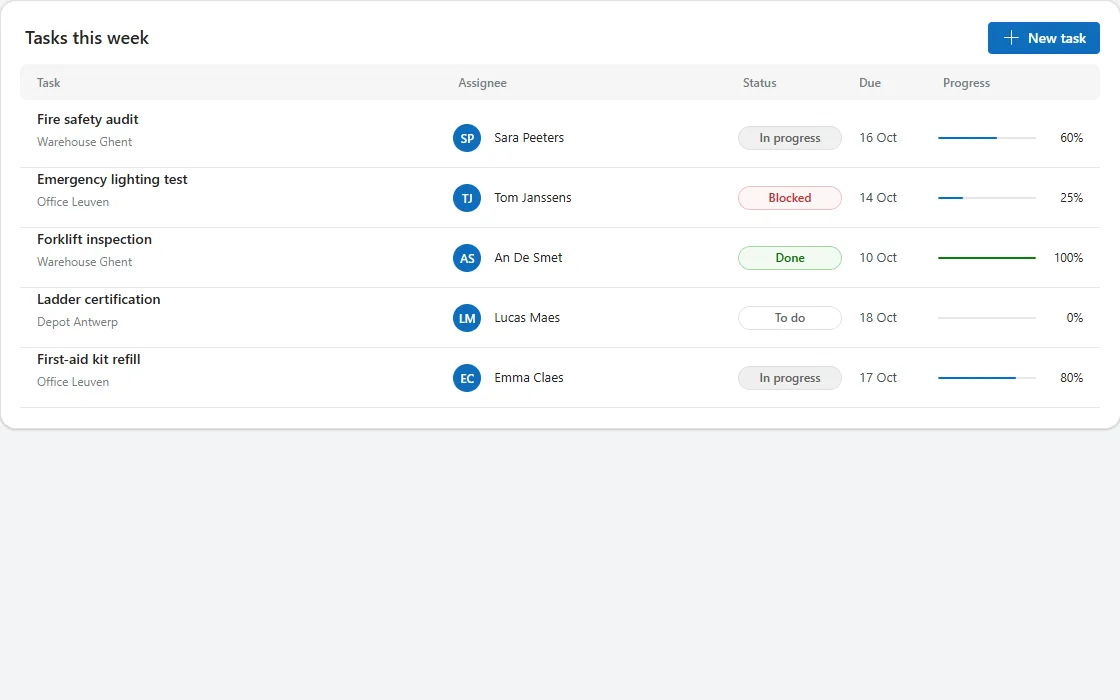
A table card with column headers and rows showing task and project, assignee avatar, status pill, due date and a progress bar.
- Version
- 1.0.0
- Updated
- Verified in Studio
- Not yet
- Author
- Ynias Bensch
- Tags
Overview
A table in a card for the work of the week: task and project, the assignee with an initials avatar, a status pill, the due date and a progress bar with its percentage. Column headers sit on a light band, and thin dividers separate the rows.
It is a gallery, not a data table, so every cell can hold whatever control fits: avatars, pills, progress bars. The Task and Assignee columns share the free width; the others are fixed.
When to use
- Up to about ten rows that people scan and compare.
- Desktop and tablet screens wider than about 900 pixels.
When not to use
- Large data sets that need sorting, column resizing or inline editing: use the modern data table.
- Phones: use the card list, which stacks the same information.
Controls used
| Control | Version |
|---|---|
| GroupContainer | 1.5.0 |
| ModernText | 1.0.0 |
| ModernButton | 1.0.0 |
| Gallery | 2.15.0 |
| ModernAvatar | 1.1.0 |
| ModernBadge | 1.0.0 |
| ModernProgressBar | 1.0.0 |
YAML
Works as is, with example data inline. Paste it into a screen or container; the steps are underHow to paste.
Not yet verified in Power Apps Studio. The control versions are drafted from documentation. If Studio flags one, see How to paste for the fix.
- TaskTableRoot:
Control: GroupContainer@1.5.0
Variant: AutoLayout
Properties:
BorderColor: =ColorFade(App.Theme.Colors.Darker70, 88%)
BorderThickness: =1
DropShadow: =DropShadow.Light
Fill: =Color.White
Height: =TaskTableHeader.Height + TaskTableColumns.Height + TaskTableGallery.Height + 2 * 8 + 40
LayoutDirection: =LayoutDirection.Vertical
LayoutGap: =8
PaddingBottom: =20
PaddingLeft: =20
PaddingRight: =20
PaddingTop: =20
RadiusBottomLeft: =16
RadiusBottomRight: =16
RadiusTopLeft: =16
RadiusTopRight: =16
Width: =Parent.Width
Children:
- TaskTableHeader:
Control: GroupContainer@1.5.0
Variant: AutoLayout
Properties:
AlignInContainer: =AlignInContainer.Stretch
DropShadow: =DropShadow.None
FillPortions: =0
Height: =36
LayoutAlignItems: =LayoutAlignItems.Center
LayoutDirection: =LayoutDirection.Horizontal
LayoutGap: =8
LayoutMinHeight: =36
LayoutMinWidth: =120
Children:
- TaskTableTitle:
Control: ModernText@1.0.0
Properties:
AccessibleLabel: =Self.Text
FillPortions: =1
FontWeight: =FontWeight.Semibold
Height: =36
LayoutMinHeight: =0
LayoutMinWidth: =80
Size: =18
Text: ="Tasks this week"
Wrap: =false
- TaskTableNew:
Control: ModernButton@1.0.0
Properties:
AccessibleLabel: =Self.Text
Appearance: =ButtonAppearance.Primary
Height: =32
Icon: ="Add"
LayoutMinHeight: =32
LayoutMinWidth: =104
OnSelect: =Notify("Open the new task form", NotificationType.Information)
Size: =14
Text: ="New task"
Width: =112
- TaskTableColumns:
Control: GroupContainer@1.5.0
Variant: AutoLayout
Properties:
AlignInContainer: =AlignInContainer.Stretch
DropShadow: =DropShadow.None
Fill: =ColorFade(App.Theme.Colors.Darker70, 96%)
FillPortions: =0
Height: =36
LayoutAlignItems: =LayoutAlignItems.Center
LayoutDirection: =LayoutDirection.Horizontal
LayoutGap: =12
LayoutMinHeight: =36
LayoutMinWidth: =120
PaddingLeft: =12
PaddingRight: =12
RadiusBottomLeft: =8
RadiusBottomRight: =8
RadiusTopLeft: =8
RadiusTopRight: =8
Children:
- TaskTableColTask:
Control: ModernText@1.0.0
Properties:
AccessibleLabel: =Self.Text
Color: =ColorFade(App.Theme.Colors.Darker70, 45%)
FillPortions: =3
FontWeight: =FontWeight.Semibold
Height: =28
LayoutMinHeight: =0
LayoutMinWidth: =80
Size: =12
Text: ="Task"
- TaskTableColAssignee:
Control: ModernText@1.0.0
Properties:
AccessibleLabel: =Self.Text
Color: =ColorFade(App.Theme.Colors.Darker70, 45%)
FillPortions: =2
FontWeight: =FontWeight.Semibold
Height: =28
LayoutMinHeight: =0
LayoutMinWidth: =60
Size: =12
Text: ="Assignee"
- TaskTableColStatus:
Control: ModernText@1.0.0
Properties:
AccessibleLabel: =Self.Text
Color: =ColorFade(App.Theme.Colors.Darker70, 45%)
FontWeight: =FontWeight.Semibold
Height: =28
LayoutMinHeight: =0
LayoutMinWidth: =104
Size: =12
Text: ="Status"
Width: =104
- TaskTableColDue:
Control: ModernText@1.0.0
Properties:
AccessibleLabel: =Self.Text
Color: =ColorFade(App.Theme.Colors.Darker70, 45%)
FontWeight: =FontWeight.Semibold
Height: =28
LayoutMinHeight: =0
LayoutMinWidth: =72
Size: =12
Text: ="Due"
Width: =72
- TaskTableColProgress:
Control: ModernText@1.0.0
Properties:
AccessibleLabel: =Self.Text
Color: =ColorFade(App.Theme.Colors.Darker70, 45%)
FontWeight: =FontWeight.Semibold
Height: =28
LayoutMinHeight: =0
LayoutMinWidth: =150
Size: =12
Text: ="Progress"
Width: =150
- TaskTableGallery:
Control: Gallery@2.15.0
Variant: Vertical
Properties:
AccessibleLabel: ="Tasks"
AlignInContainer: =AlignInContainer.Stretch
BorderThickness: =0
FillPortions: =0
Height: =Self.AllItemsCount * (Self.TemplateHeight + Self.TemplatePadding) + Self.TemplatePadding
Items: |
=Table(
{Task: "Fire safety audit", Project: "Warehouse Ghent", Assignee: "Sara Peeters", Status: "In progress", Due: Date(2026, 10, 16), Progress: 60},
{Task: "Emergency lighting test", Project: "Office Leuven", Assignee: "Tom Janssens", Status: "Blocked", Due: Date(2026, 10, 14), Progress: 25},
{Task: "Forklift inspection", Project: "Warehouse Ghent", Assignee: "An De Smet", Status: "Done", Due: Date(2026, 10, 10), Progress: 100},
{Task: "Ladder certification", Project: "Depot Antwerp", Assignee: "Lucas Maes", Status: "To do", Due: Date(2026, 10, 18), Progress: 0},
{Task: "First-aid kit refill", Project: "Office Leuven", Assignee: "Emma Claes", Status: "In progress", Due: Date(2026, 10, 17), Progress: 80}
)
LayoutMinHeight: =0
LayoutMinWidth: =120
ShowScrollbar: =false
TabIndex: =0
TemplatePadding: =0
TemplateSize: =60
Children:
- TaskTableRow:
Control: GroupContainer@1.5.0
Variant: AutoLayout
Properties:
DropShadow: =DropShadow.None
Height: =Parent.TemplateHeight - 1
LayoutAlignItems: =LayoutAlignItems.Center
LayoutDirection: =LayoutDirection.Horizontal
LayoutGap: =12
PaddingLeft: =12
PaddingRight: =12
Width: =Parent.TemplateWidth
X: =0
Y: =0
Children:
- TaskTableTaskCell:
Control: GroupContainer@1.5.0
Variant: AutoLayout
Properties:
DropShadow: =DropShadow.None
FillPortions: =3
Height: =42
LayoutDirection: =LayoutDirection.Vertical
LayoutGap: =2
LayoutMinHeight: =42
LayoutMinWidth: =80
Children:
- TaskTableTaskTitle:
Control: ModernText@1.0.0
Properties:
AccessibleLabel: =Self.Text
AlignInContainer: =AlignInContainer.Stretch
FontWeight: =FontWeight.Semibold
Height: =22
LayoutMinHeight: =0
LayoutMinWidth: =60
PaddingBottom: =0
PaddingTop: =0
Size: =14
Text: =ThisItem.Task
Wrap: =false
- TaskTableTaskProject:
Control: ModernText@1.0.0
Properties:
AccessibleLabel: =Self.Text
AlignInContainer: =AlignInContainer.Stretch
Color: =ColorFade(App.Theme.Colors.Darker70, 45%)
Height: =18
LayoutMinHeight: =0
LayoutMinWidth: =60
PaddingBottom: =0
PaddingTop: =0
Size: =12
Text: =ThisItem.Project
Wrap: =false
- TaskTableAssigneeCell:
Control: GroupContainer@1.5.0
Variant: AutoLayout
Properties:
DropShadow: =DropShadow.None
FillPortions: =2
Height: =32
LayoutAlignItems: =LayoutAlignItems.Center
LayoutDirection: =LayoutDirection.Horizontal
LayoutGap: =8
LayoutMinHeight: =32
LayoutMinWidth: =60
Children:
- TaskTableAvatar:
Control: ModernAvatar@1.1.0
Properties:
AccessibleLabel: =TaskTableAssignee.Text
Badge: =PresenceBadge.None
Height: =28
Image: =Blank()
LayoutMinHeight: =28
LayoutMinWidth: =28
Name: =ThisItem.Assignee
Width: =28
- TaskTableAssignee:
Control: ModernText@1.0.0
Properties:
AccessibleLabel: =Self.Text
FillPortions: =1
Height: =30
LayoutMinHeight: =0
LayoutMinWidth: =40
Size: =13
Text: =ThisItem.Assignee
Wrap: =false
- TaskTableStatus:
Control: ModernBadge@1.0.0
Properties:
AccessibleLabel: ="Status " & ThisItem.Status
Appearance: =BadgeAppearance.Tint
Content: =ThisItem.Status
Height: =24
Intent: =Switch(ThisItem.Status, "Done", BadgeIntent.Positive, "Blocked", BadgeIntent.Critical, "In progress", BadgeIntent.Informative, BadgeIntent.Neutral)
LayoutMinHeight: =24
LayoutMinWidth: =104
Size: =12
Width: =104
- TaskTableDue:
Control: ModernText@1.0.0
Properties:
AccessibleLabel: =Self.Text
Color: =ColorFade(App.Theme.Colors.Darker70, 25%)
Height: =30
LayoutMinHeight: =0
LayoutMinWidth: =72
Size: =13
Text: =Text(ThisItem.Due, "d mmm")
Width: =72
Wrap: =false
- TaskTableProgressCell:
Control: GroupContainer@1.5.0
Variant: AutoLayout
Properties:
DropShadow: =DropShadow.None
Height: =30
LayoutAlignItems: =LayoutAlignItems.Center
LayoutDirection: =LayoutDirection.Horizontal
LayoutGap: =8
LayoutMinHeight: =30
LayoutMinWidth: =150
Width: =150
Children:
- TaskTableProgress:
Control: ModernProgressBar@1.0.0
Properties:
AccessibleLabel: =TaskTableTaskTitle.Text & " progress"
FillPortions: =1
Height: =16
LayoutMinHeight: =16
LayoutMinWidth: =60
ProgressColor: =If(ThisItem.Progress = 100, ProgressColor.Success, ProgressColor.Brand)
Value: =ThisItem.Progress
- TaskTableProgressValue:
Control: ModernText@1.0.0
Properties:
AccessibleLabel: =Self.Text
Align: =Align.Right
Height: =30
LayoutMinHeight: =0
LayoutMinWidth: =40
Size: =12
Text: =ThisItem.Progress & "%"
Width: =44
Wrap: =false
- TaskTableDivider:
Control: GroupContainer@1.5.0
Variant: ManualLayout
Properties:
DropShadow: =DropShadow.None
Fill: =ColorFade(App.Theme.Colors.Darker70, 90%)
Height: =1
Width: =Parent.TemplateWidth
X: =0
Y: =Parent.TemplateHeight - 1Make it yours
The example runs on sample data. Replace these properties to connect it to your app.
Items on TaskTableGallery
The rows. The table grows with them, so show a page of rows and link to the full list.
In the YAML
Items: |
  =Table(
      {Task: "Fire safety audit", Project: "Warehouse Ghent", Assignee: "Sara Peeters", Status: "In progress", Due: Date(2026, 10, 16), Progress: 60},
      {Task: "Emergency lighting test", Project: "Office Leuven", Assignee: "Tom Janssens", Status: "Blocked", Due: Date(2026, 10, 14), Progress: 25},
      {Task: "Forklift inspection", Project: "Warehouse Ghent", Assignee: "An De Smet", Status: "Done", Due: Date(2026, 10, 10), Progress: 100},
      {Task: "Ladder certification", Project: "Depot Antwerp", Assignee: "Lucas Maes", Status: "To do", Due: Date(2026, 10, 18), Progress: 0},
      {Task: "First-aid kit refill", Project: "Office Leuven", Assignee: "Emma Claes", Status: "In progress", Due: Date(2026, 10, 17), Progress: 80}
  )
Your version
Items: =FirstN(Sort(Filter(Tasks, 'Due date' <= Today() + 7), 'Due date', SortOrder.Ascending), 8)Text on TaskTableTaskTitle
The main column. TaskTableTaskProject underneath shows the second line.
In the YAML
Text: =ThisItem.TaskYour version
Text: =ThisItem.TitleContent on TaskTableStatus
The pill text. Map your statuses to colours in the pill's Intent.
In the YAML
Content: =ThisItem.StatusYour version
Content: =ThisItem.Status.ValueValue on TaskTableProgress
Progress from 0 to 100. The bar turns green at 100.
In the YAML
Value: =ThisItem.ProgressYour version
Value: =ThisItem.'Percent complete'How to paste
- Open your app in Power Apps Studio.
- Check that modern controls are on: Settings → Updates → Modern controls and themes. In newer environments they are on by default.
- Copy the YAML with the Copy button above the code.
- In the Tree view, select the screen or container that should hold the component and press Ctrl+V. The whole component arrives as one container,
TaskTableRoot, with all its controls inside. - Work through Make it yours to swap the example data for your own.
Where your version of Studio has a code view for a control or screen, you can paste the same YAML there instead of into the tree view.
When Studio flags a control version
Each control in the YAML names its version, like Control: ModernButton@1.0.0. If that version is newer than what your environment knows, Studio falls back to the version it has or flags the control. All controls of one type in an app must also use the same version, so an app that already has an older ModernButton can reject the paste. To fix it, insert the same control from the Insert pane, copy it as code, note the version on its Control: line, update every matching line in the YAML and paste again.
Missing a component, or did this one not paste cleanly? Suggest a component or report an issue.