Half My Page Requests Come From Bots: What I Block, Hide and Leave Open
Bots make half my page requests. The Cloudflare rules I added, the habits that keep secrets off the server and what I leave open for AI agents.
Key takeaways
- Analytics hides bots. GA4 showed me about 100 visitors in 28 days, while the server logs showed 2,910 requests in a single day. Bots that identify themselves made 48% of the page requests.
- There are two kinds of bots. Scanners look for files you forgot, such as
/.envand/.git. Crawlers and AI agents read what you published. They need opposite answers. - One Cloudflare custom rule blocks the scanner paths with a 403. It fits in the free plan and blocked 88 requests on one small site in a day.
- A rate limit on
/api/slows down anyone who hammers it. Leave your own scheduled jobs and payment webhooks out of it. - The rule removes noise. What keeps you safe is that there is nothing to find: secrets in
.gitignoreand in the host's environment variables, and no folder full of leftovers on the server. - For crawlers and agents I do the opposite: an open
robots.txt, a sitemap, an RSS feed, structured data and pages that work without JavaScript.
I asked a simple question about this blog: can I see whether bots visit it? Analytics said about 100 visitors in 28 days. The server logs said 2,910 requests in the last 24 hours.
That gap sent me through the logs of three sites I run: this blog, a small business site and a web app with an API and online payments. This post is what I found, what I changed in Cloudflare, what was already in place, and what I leave open on purpose. I don't name the other two sites, and the IP addresses in the illustrations are examples.
What the logs show
GA4 counts a visitor when a browser runs its JavaScript and the visitor accepts cookies. It also filters known bots. Most bots never get that far, so they never show up.
The host sees everything. For this blog that's Netlify, which keeps a log of every request for 24 hours on my plan. This is one day of requests for pages, without images, scripts and stylesheets:
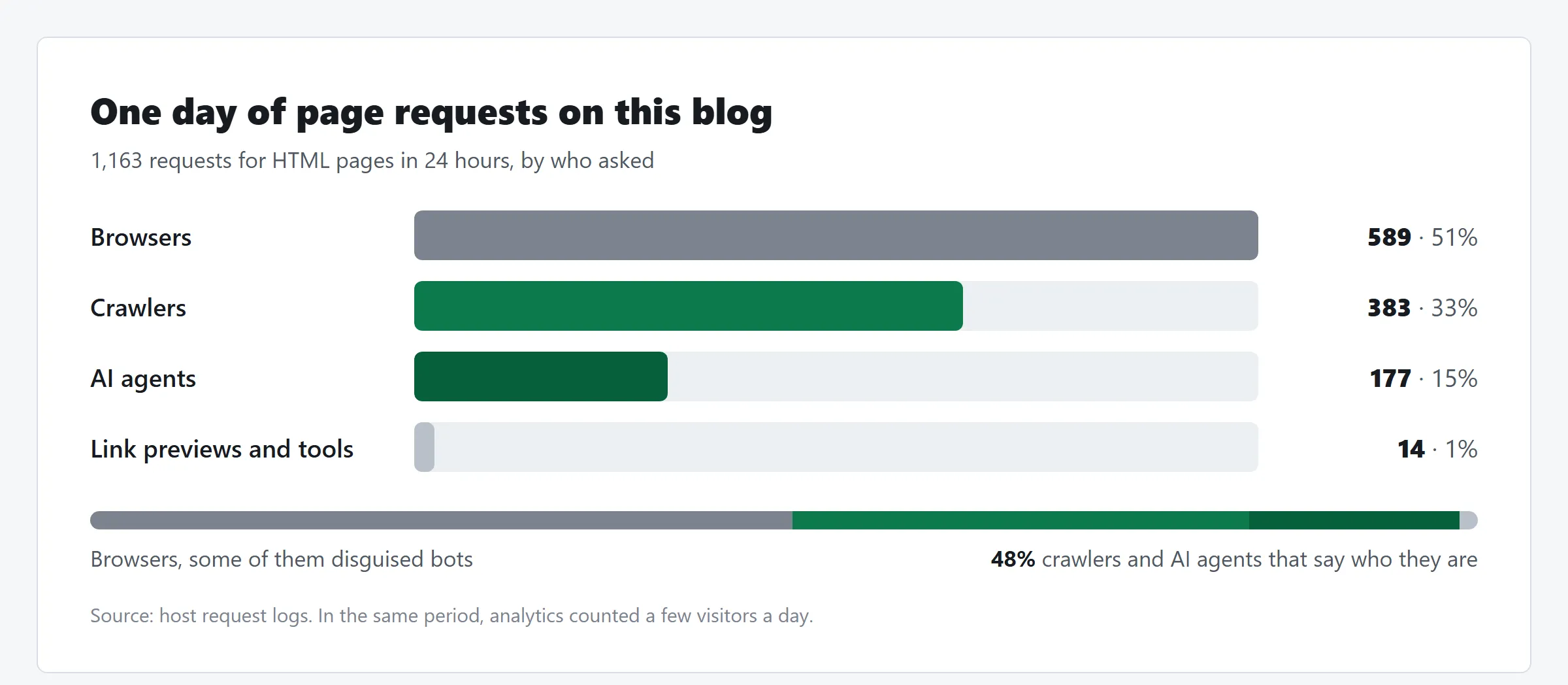
| Who | Page requests | Share |
|---|---|---|
| Browsers | 589 | 51% |
| Crawlers | 383 | 33% |
| AI agents | 177 | 15% |
| Link previews and tools | 14 | 1% |
Crawlers and AI agents together make 48% of the page requests. And that's only the bots that say who they are. The busiest ones that day:
| Bot | Requests | What it does |
|---|---|---|
Meta (meta-externalagent, meta-webindexer) | 388 | AI training and indexing |
| ExaSearchBot | 139 | AI search engine |
| Slackbot | 106 | Link previews |
| PetalBot | 93 | Huawei's search engine |
| SemrushBot | 51 | SEO tool |
| Bingbot | 36 | Search engine |
| Bytespider | 27 | ByteDance |
| OAI-SearchBot | 25 | ChatGPT search |
Some of the "browsers" aren't people either. Those requests came mostly from Singapore, the United States and China, while GA4 puts my readers mainly in Belgium and the United Kingdom. I can't say how many are disguised, because visitors who refuse cookies are in that group too.
Two kinds of bots
Everything above is a bot that reads what I published. The logs also show a second kind.
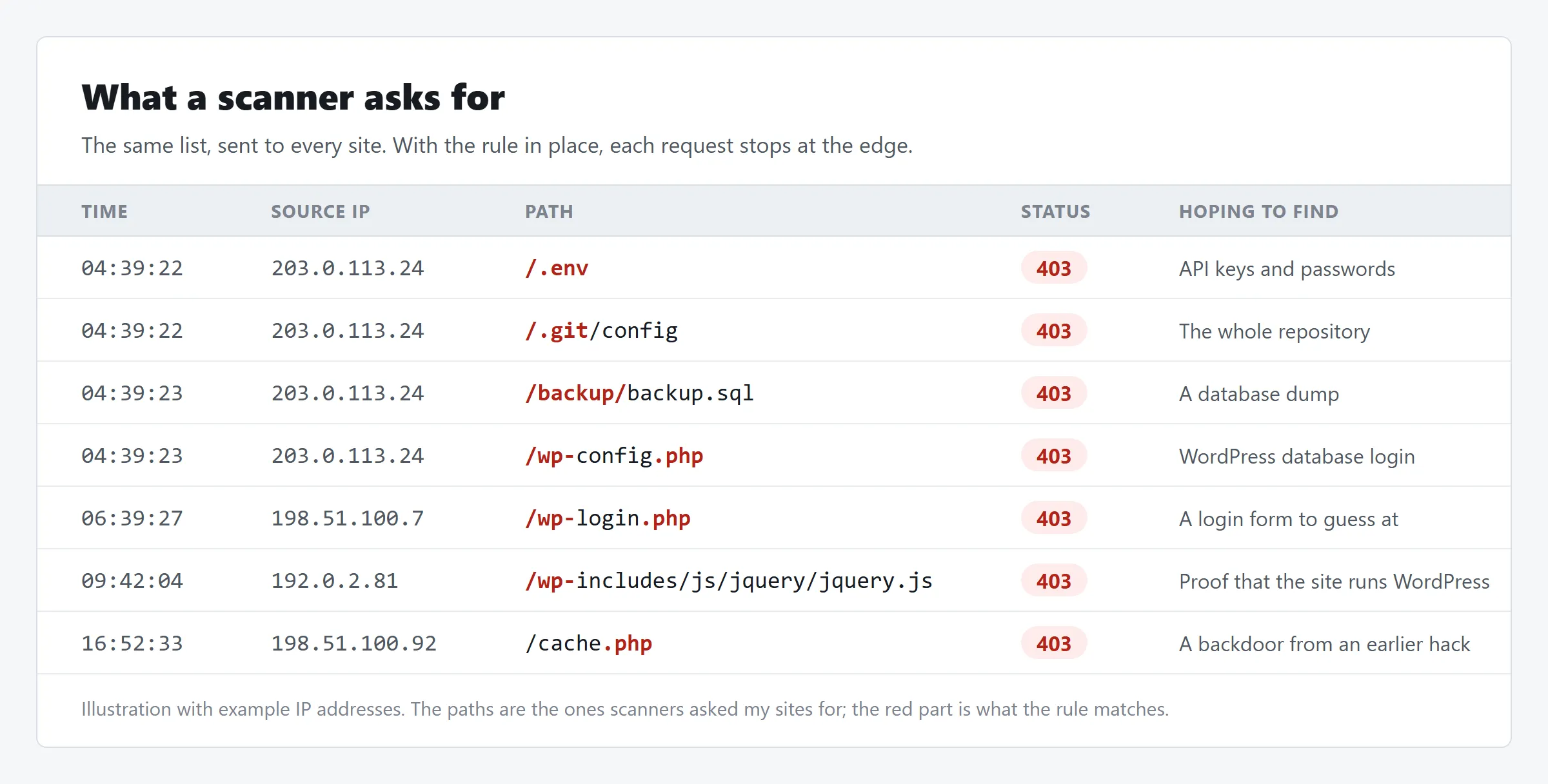
Scanners don't read your pages. They ask every site on the internet for the same list of files and hope one answers. On my sites they asked for:
/.env,/.git-secretand/credentials.json: files with keys and passwords/backup/backup.sql: a database dump someone left on the serverwp-config.php,wp-login.phpandwp-admin: WordPress, which none of these sites runcache.php: 110 requests in one day from a scanner that calls itselfMozlila, typo included
On the web app, a single IP address made about 1,750 of these requests in 30 days.
None of it is aimed at me. It's background noise that every public site gets. But one forgotten file is enough, so it's worth an answer.
Crawlers and AI agents read your content to index it, answer questions with it or train on it. If you write to be found, you want most of them.
So the two kinds get opposite answers. Scanners get a closed door, and behind that door there should be nothing. Crawlers and agents get a site that is easy to read.
What I set up in Cloudflare
The business site and the web app sit behind Cloudflare, on the free plan. Before I touched anything, Cloudflare's own managed rules were already blocking the worst requests: 19 in three days on the web app. Everything else got a redirect, a 401 or a 404.
This is what I added, and what I left out.
| Measure | Setting | Why |
|---|---|---|
| Custom rule "Block scanners" | 403 on paths that contain /.env, /.git, /wp-, /backup/ or .php | Scanners stop at the edge and never reach the site |
| Rate limiting rule on the API | 100 requests per 10 seconds per IP address, then 10 seconds of 429 | Nobody can hammer the API |
| DNSSEC | On, with the DS record at the registrar | DNS answers for the domain can't be forged |
| Bot Fight Mode | Off, on purpose | It can challenge API traffic I need |
| Blocking IP addresses or countries | Not done | Scanners change address all the time |
One custom rule for scanner paths
The whole rule is one expression, under Security > Security rules > Custom rules, with the action Block:
(http.request.uri.path contains "/.env")
or (http.request.uri.path contains "/.git")
or (http.request.uri.path contains "/wp-")
or (http.request.uri.path contains "/backup/")
or (http.request.uri.path contains ".php")
The free plan allows five custom rules, and this uses one.
Check your own site before you copy it. The rule blocks every path that contains .php or /wp-. That's right for my sites, which run no PHP. On a WordPress site it blocks the site itself.
Test it by asking for one of the paths:
curl -I https://www.example.com/.envThe answer should be 403. The dashboard counts the hits per rule. On the business site the rule blocked 88 requests in 24 hours, on the web app 4.
A rate limit on the API
The web app has an API for sign-ups and payments. A rate limiting rule gives every IP address 100 requests per 10 seconds on paths that contain /api/. Past that, the address gets a 429 for 10 seconds. The free plan allows one such rule, with these 10-second windows.
Two kinds of traffic are left out of the rule: the app's own scheduled jobs and the webhook of the payment provider. Both come from a server, not from a visitor, and a blocked payment webhook means a paid order that never gets confirmed. If you build a rule like this, list your server-to-server callers first.
What I left off
Bot Fight Mode. Bot Fight Mode challenges traffic that Cloudflare recognises as automated. It works on the whole domain and a custom rule can't skip it for one path. On a site with an API that's a risk: a scheduled job or a webhook is automated traffic too. Its challenges also load scripts, which my Content Security Policy would have to allow. On a plain content site without an API I would turn it on.
IP and country blocks. The security events from one day show requests from the United States, Poland, the Netherlands and Indonesia. Block one address and the next scan comes from another. Blocking by path works whatever the address is.
What was already in place
The rule is the visible part. It isn't what keeps the sites safe. A scanner that asks for /.env only wins when that file is there, and these habits make sure it isn't.
Secrets never enter the repository. The .gitignore of this blog starts like this:
node_modules/
dist/
.astro/
.netlify/
.env
.env.*
!.env.example
.claude/
.env and every variant are ignored. .env.example is the exception: it lists the names of the variables without values, so a new machine knows what to fill in. Local tool folders stay out as well.
Real secrets live at the host. Netlify and Cloudflare store them as environment variables, and the build reads them from there. Anything that starts with PUBLIC_ ends up in the page source, so it only holds values that are public anyway, such as an analytics ID.
A printed secret is a rotated secret. During the move from WordPress to Astro, a coding agent listed environment variables and their values showed up in the session. Nothing was published, but I rotated them. A secret that appeared in a log or a chat is no longer fully yours.
The server holds only the build output. Hosting deploys the output folder and nothing else. There's no .git folder, no backup and no config file next to the pages. Putting a whole project folder on a server by FTP is how /.git/config and backup.sql become reachable.
No PHP and no database. This blog is static HTML. Every wp-login.php request gets a 404, because there's no login to attack.
The admin screen has its own lock. The editor of this blog lives at /keystatic and signs in through GitHub. It's in robots.txt to keep it out of search results. That doesn't protect it. The login does.
Two-factor authentication on every account in the chain. Registrar, DNS, host and GitHub. A firewall rule doesn't help when someone signs in as you. Check each one, because I found an account where I had assumed it was on.
What I leave open on purpose
Now the other half. A third of my page requests come from crawlers and 15% from AI agents. I want those to succeed.
An open robots.txt. This is the whole file:
User-agent: *
Allow: /
Disallow: /keystatic
Disallow: /api/

Sitemap: https://www.benschmark.eu/sitemap.xml
Everything is allowed, except two paths that hold nothing to read. robots.txt is a request. Good crawlers follow it and scanners ignore it. It's also public, so it's the wrong place to hide anything.
A sitemap and an RSS feed. The sitemap lists every page with its last change, so a crawler doesn't have to guess. The feed gives readers and tools the new posts.
Pages that work without JavaScript. Many crawlers and agents fetch the HTML and don't run scripts. A static page gives them the full text in one request.
Structured data. Every post carries JSON-LD that says it's a blog post, who wrote it and when. The FAQ at the bottom of each post is in there as question and answer pairs. An agent doesn't have to work that out from the layout.
Clear headings, key takeaways and an FAQ. They help a person who skims, and they help a model that needs to quote the right paragraph.
Next: llms.txt. llms.txt is a proposal for a Markdown file that tells a language model what a site contains and where the important pages are. It isn't a standard and I can't yet tell which agents read it. It's cheap to add, so it's next on my list.
Whether to let AI crawlers in is your call. My posts are public and I write them to be found. An AI search engine that reads a post can send a reader to it. If your content is what you sell, or you don't want it in training data, add a Disallow for those crawlers. Keep in mind that it remains a request.
A checklist for your own site
- Read the server logs. Use the logs of your host or CDN, not your analytics.
- Request your own secrets. Ask your live site for
/.envand/.git/config. Anything other than a 403 or a 404 is a problem to fix today. - Check
.gitignore..envand its variants belong in it. Search the history of the repository for keys that were committed before that. - Rotate what was ever exposed. In a commit, a log or a chat.
- Block the scanner paths with one firewall rule, after you checked that your site doesn't use them.
- Rate limit the API, and leave your own jobs and webhooks out.
- Turn on two-factor authentication at the registrar, DNS, host and Git provider.
- Open the door for readers:
robots.txt, a sitemap, structured data and HTML that works without scripts.
Scanners get a 403 and an empty server. Crawlers and agents get a site that's easy to read.
FAQ
How do I see whether bots visit my site?
Look at the request logs of your host or CDN, not at your analytics. GA4 only counts visitors that run JavaScript and accept cookies, and it filters known bots. Netlify shows requests under Observability and Cloudflare under Security > Analytics.
Is blocking /.env in the firewall enough?
No. The rule only saves you noise and gives a clean 403. The real protection is that the file is not on the server and was never in the repository. If a secret has ever been public, rotate it.
Should I turn on Bot Fight Mode?
On a plain content site it's a reasonable choice. I left it off on a site with an API, because it works on the whole domain, can't be skipped for one path and can challenge server-to-server calls such as payment webhooks.
Does robots.txt keep bots out?
No. It's a request that well-behaved crawlers follow and scanners ignore. It's also public, so never use it to hide a path. Use it to tell crawlers what is worth their time.
Should I block AI crawlers?
That depends on what your content is for. Mine is public and written to be found, and AI search can send readers my way, so I allow them. If you sell your content or don't want it in training data, a Disallow per crawler is the place to start.
Published