Ignite 2026 Day 1: What Changes for Power Platform Makers and Admins
Ignite 2026 day 1 for Power Platform teams: apps in Copilot Studio, the Copilot Managed Runtime, Agent Accounts, Work IQ and Agent 365 cost control.
Key takeaways
- You can now build apps in Copilot Studio by describing them. It is generally available, the code is yours to edit, and the apps use connectors and Work IQ for data.
- The Copilot Managed Runtime hosts those apps in your tenant. Admins see every published app in the Microsoft 365 admin center, whichever tool built it.
- Copilot Studio agents and workflows can be built locally and published with a CLI, in public preview. That gives agents a pull request workflow.
- Agent Accounts give an agent its own credentials instead of a maker's. Private preview in Frontier now, public preview in December 2026.
- Usage is billed in Copilot Credits. Agent 365 Cost Management, in preview, sets spending limits per user, group or environment.
Microsoft Ignite 2026 opened on 17 November. This post lists the day 1 announcements that affect people who build and govern on Power Platform. For each one: what it is, its status, what changes for you and where to read more.
Two screenshots come from Microsoft Learn and are credited below each one. The other images are illustrations I made from Microsoft's descriptions, with Contoso sample data.
The short list
| Announcement | What it is | Status |
|---|---|---|
| Apps in Copilot Studio | Describe an app, get working code | Generally available |
| Copilot Managed Runtime | Microsoft-run hosting for those apps | Generally available, rolling out |
| Local development for agents and workflows | Build locally, publish with a CLI | Public preview |
| Microsoft Copilot harness | Engine for long, multi-step agent work | Generally available |
| Agent Accounts | Agents with their own credentials | Private preview (Frontier), public preview December 2026 |
| Windows 365 for Agents | A Cloud PC an agent can operate | Available in the standard harness |
| Business Applications in Work IQ | CRM, ERP and Power Platform data as agent context | Generally available, ERP in preview |
| Business plugins | Reusable package of context, skills and tools | Frontier |
| Agent 365 Cost Management | Spending limits and alerts for AI usage | Preview |
| Agent 365 Business Analytics | Spend, adoption and value in one app | Frontier preview |
| Entra Agent ID and MCP firewall | Identity and network control for agents | Preview |
Frontier is Microsoft's preview program for its newest AI features. Check whether your tenant is in it.
Building
Apps in Copilot Studio
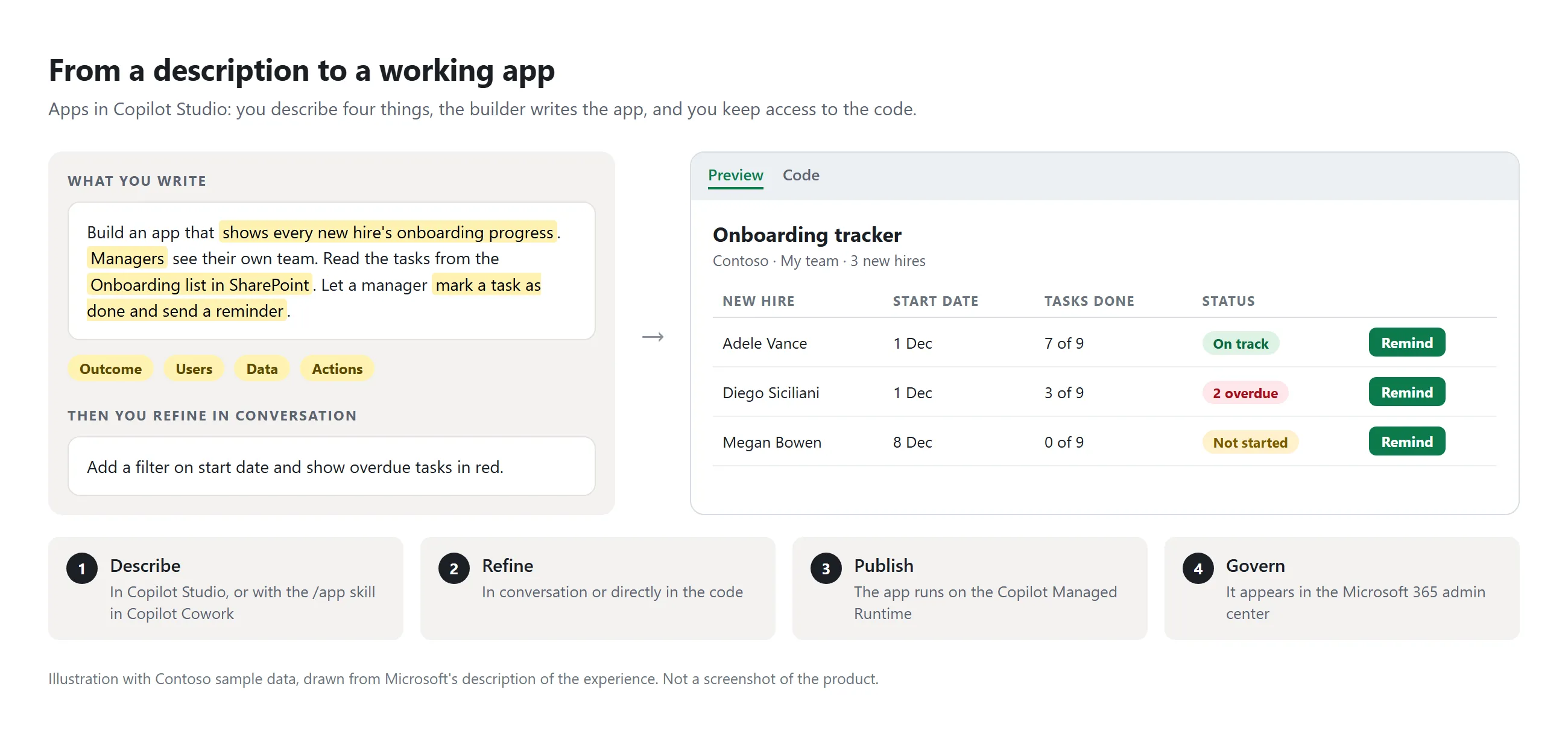
What it is. You describe the outcome, the users, the data and the actions. Copilot Studio generates a full-stack app, and you refine it in conversation or in the code. The same builder runs in Copilot Cowork as the /app skill. Apps reach data through connectors and Work IQ, and they can write back.
This is the real thing, from Microsoft's documentation. The chat is on the left (1), the generated app on the right. The menu (2) holds the app's data, connections and settings. The two icons next to it switch between the preview (3) and the code (4), and Publish sits top right (5).
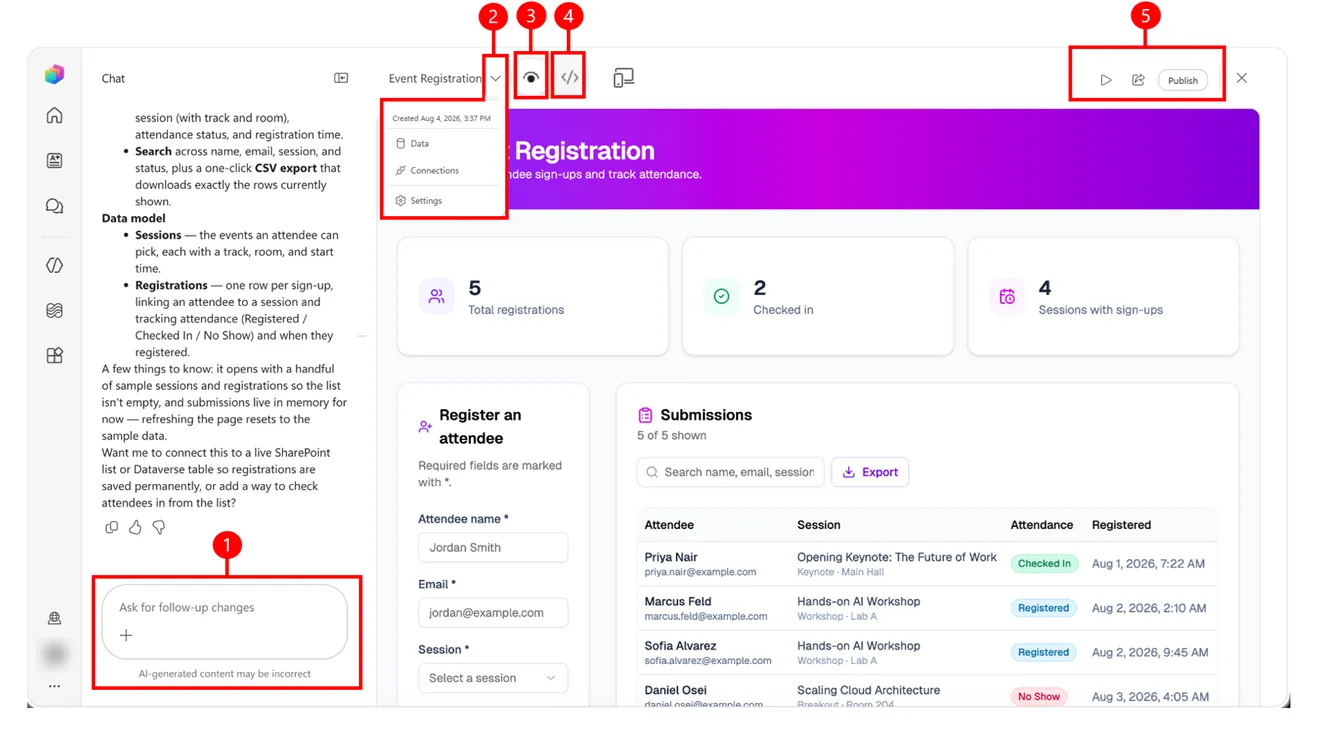
Screenshot from Apps overview on Microsoft Learn. Used with permission from Microsoft.
Status. Generally available since Ignite. It was in public preview since September.
What changes for you.
- Copilot Studio now covers apps, workflows and agents in one place. It's a second way to build a business app, next to canvas and model-driven apps.
- Source control is built in: Git-backed code, deployment stages and version isolation.
- Published apps are listed in the Microsoft 365 admin center, and users open them at
managedapps.cloud.microsoft.com. - Building and running apps follows usage-based billing.
- Microsoft says identity through Entra and your organisation's data and connector policies are respected. The articles don't say whether that means the data policies you set in the Power Platform admin center. Test it in a sandbox.
Read more: Build apps in Copilot Cowork and Copilot Studio and the Dynamics 365 Ignite post.
Copilot Managed Runtime
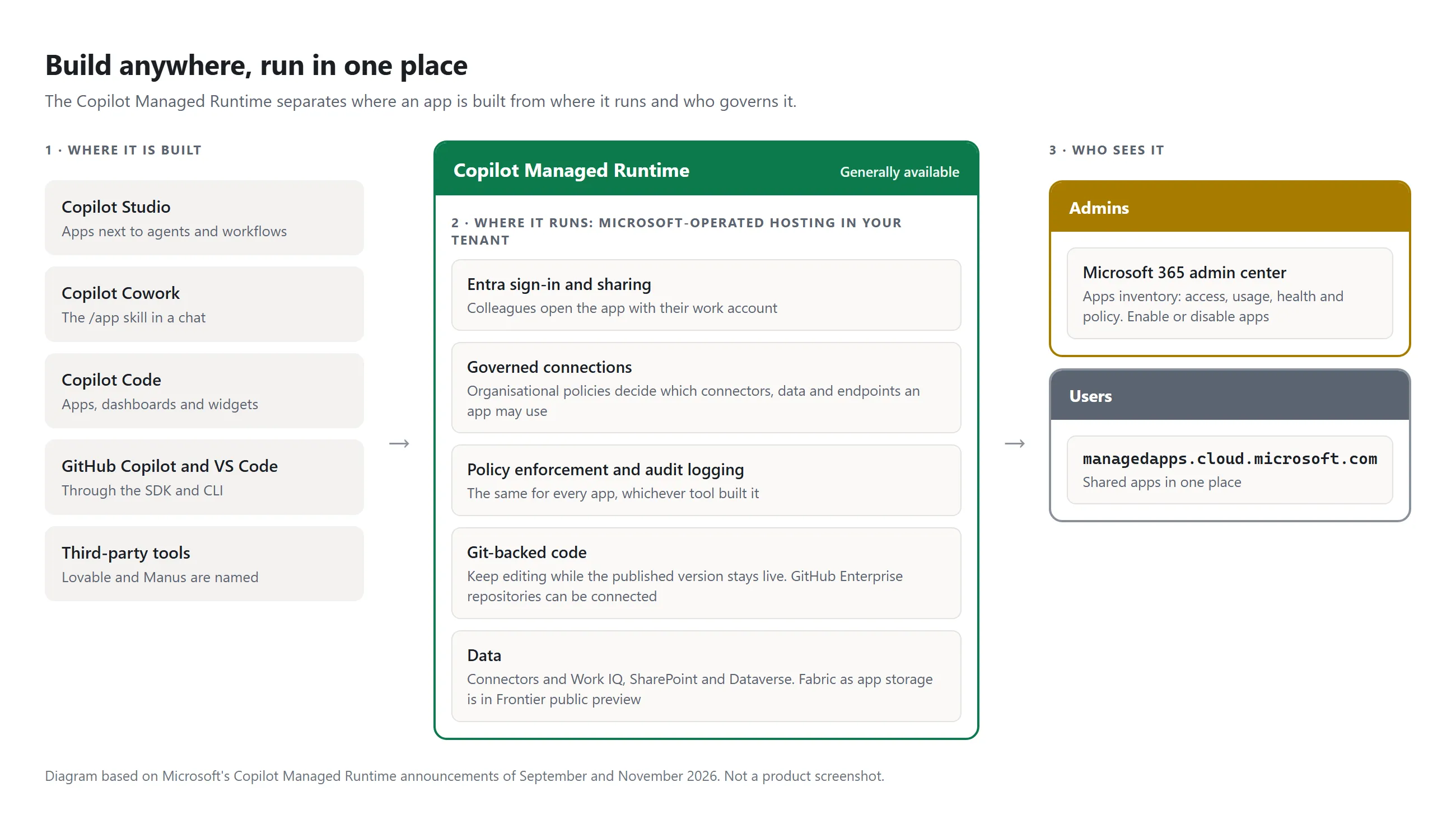
What it is. Hosting that Microsoft operates inside your tenant. It runs apps built in Copilot Studio, Copilot Cowork, Copilot Code, GitHub Copilot, VS Code and third-party tools such as Lovable and Manus. It adds Entra sign-in, sharing, governed connections, policy enforcement and audit logging.
Status. Generally available and rolling out to tenants. Fabric as app storage is in Frontier public preview. Connectivity with SharePoint and Dataverse already exists.
What changes for you.
- Admins get one inventory. The Apps experience in the Microsoft 365 admin center shows access, usage and health for every published app, and lets you enable or disable apps.
- An app someone built with an AI coding tool no longer needs its own Azure resources to run inside your tenant.
- The code stays editable. Organisations on GitHub Enterprise can connect their own repositories, so apps follow the same branching and review as other software.
Read more: Copilot Managed Runtime is now generally available and the product page.
Local development for agents and workflows
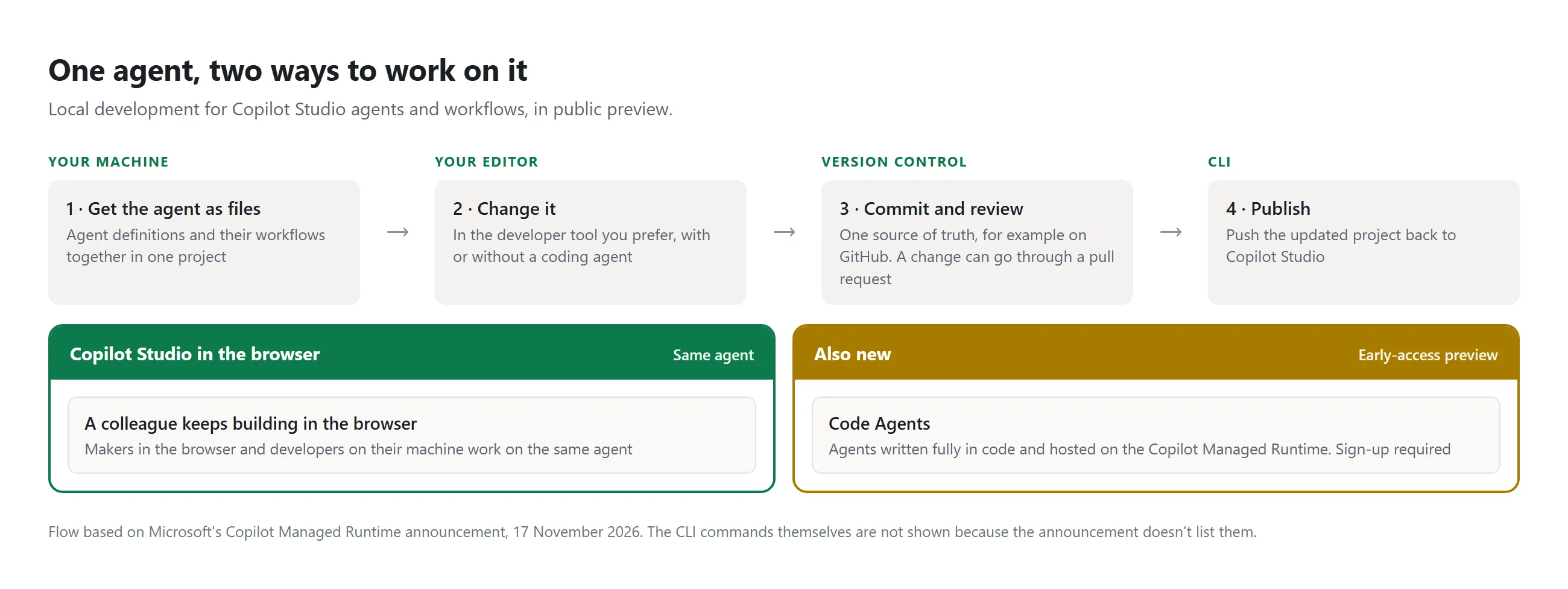
What it is. Developer tooling for Copilot Studio. You build agents and workflows on your own machine, change them in your editor of choice and publish to Copilot Studio with a CLI. The files live in your version control, for example GitHub. A colleague can keep working on the same agent in the browser.
Status. Public preview. Code Agents, which you write fully in code and host on the runtime, are in early-access preview with a sign-up. A Copilot Studio MCP server, announced in October, lets GitHub Copilot, Claude Code and Codex create, test and publish agents.
What changes for you. This is the ALM news of the day. Agent definitions become files you can diff, review in a pull request and roll back.
Read more: the runtime announcement and the October Copilot Studio update.
Microsoft Copilot harness
What it is. The engine that runs an agent. This one, formerly the GitHub Copilot harness, works in one continuous loop: take a step, check the result, decide the next step, until the task is done or a budget of time, steps or tokens runs out. The standard harness remains for fast, conversational agents.
An agent on this harness has four tabs: Build, Preview, Evaluate and Monitor. On the Build tab you write the instructions and pick the model, and you add Microsoft IQ, skills, tools, knowledge and connected agents.
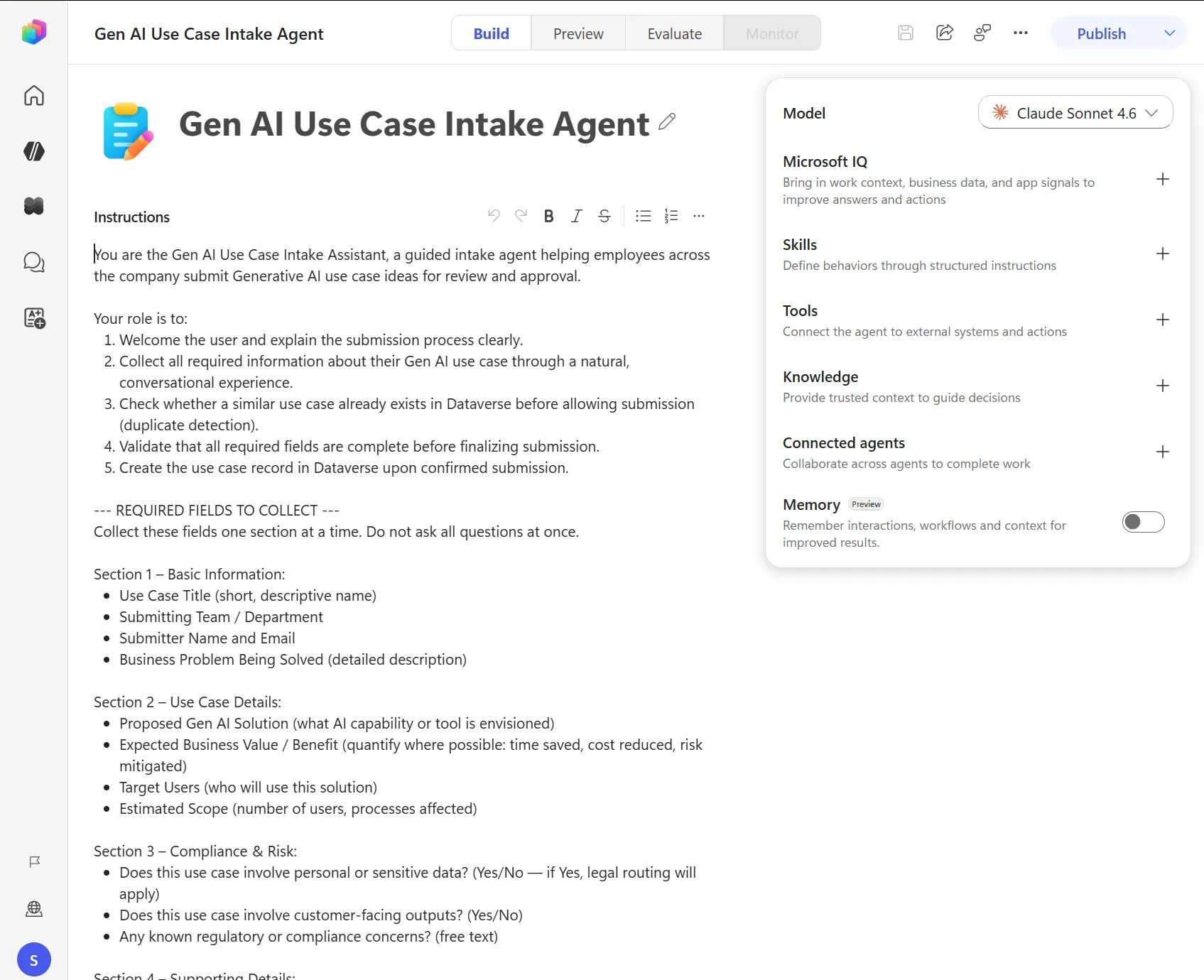
Screenshot from About agents powered by the Microsoft Copilot harness on Microsoft Learn. Used with permission from Microsoft.
Status. Generally available.
What changes for you. You pick a harness per agent. Triggers, Agent Accounts and agent-to-agent connections build on this one. Microsoft's own tests show higher task completion and fewer input tokens than the standard harness.
Read more: How the Microsoft Copilot harness helps agents finish the job.
Agent Accounts, memory and triggers
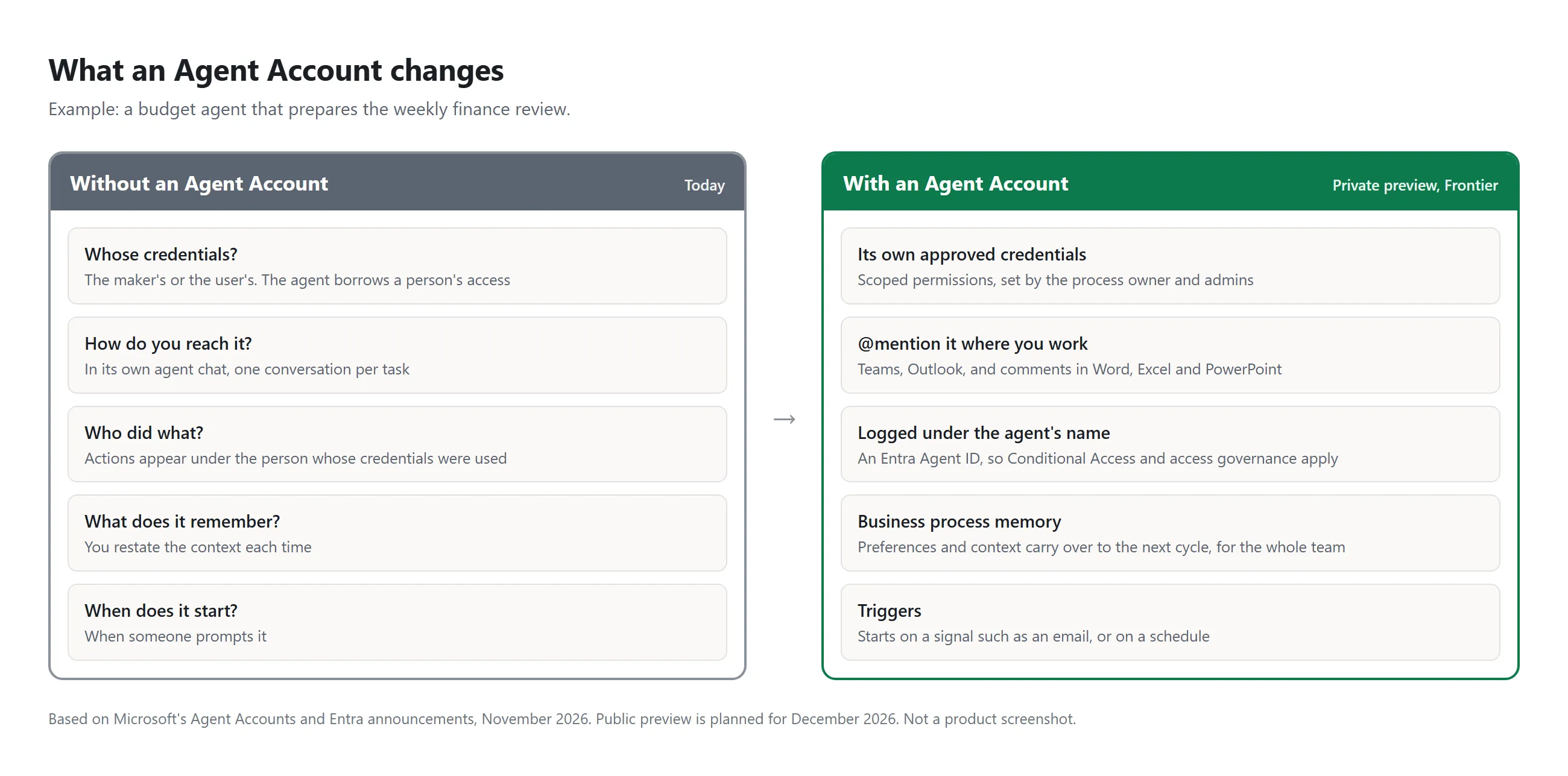
What it is. An agent gets its own account and credentials in Microsoft 365. People @mention it in Teams, Outlook or a comment in Word, Excel and PowerPoint to hand it work. Business process memory carries context from one cycle to the next. Triggers start the agent on a signal, such as an email, or on a schedule.
Status. Private preview through Frontier. Public preview in December 2026.
What changes for you.
- The agent no longer runs on a maker's or a user's credentials. Its actions are logged under its own name.
- Admins scope its access. In Entra, these agents get an agent user account and an Agent ID, so Conditional Access applies.
Read more: Delegate shared business processes to agents.
Windows 365 for Agents
What it is. A Cloud PC that an agent operates like a person would: it clicks and types in applications. It's a computer-use tool in Copilot Studio, meant for applications without an API.
Status. Available in the standard harness. Preview in the Copilot harness from December. Billed in Copilot Credits.
What changes for you. It's an option for the legacy desktop applications many of us automate with Power Automate desktop flows today. That comparison is mine, not Microsoft's.
Read more: Windows 365 at Ignite 2026.
Context
Business Applications in Work IQ
What it is. Work IQ is the layer that gives Copilot and agents context from Microsoft 365: mail, meetings, chats and files. It now adds CRM from Dynamics 365, ERP and Power Platform data. Work IQ is one part of Microsoft IQ, next to Fabric IQ, Foundry IQ and Web IQ.
Status. Generally available. The ERP part is in preview. Work IQ is also generally available in Copilot Studio.
What changes for you.
- An agent can reason across an opportunity, the emails about it and the meetings, in one request.
- The security and permissions set up in CRM and ERP are honoured.
- Admins set a tenant-wide ceiling on what agents may do, for example read, create and update but never delete. New
WorkIQ.ReadandWorkIQ.Actpermissions separate reading from acting, and a policy can require a person's approval first.
Read more: What's new in Work IQ at Ignite 2026 and the Work IQ docs.
Business plugins
What it is. A package that tells agents which context, skills, tools and authoritative sources to use for one scenario, such as supplier risk. You build it once and reuse it in Microsoft Copilot, GitHub Copilot, Foundry, ChatGPT and Claude.
Status. Frontier. Separately, the Work IQ plugin is available in the ChatGPT plugin directory for Business and Enterprise customers. The one for Claude is coming soon.
What changes for you. Process knowledge that now sits in one agent's instructions can become a governed, shared asset.
Read more: Introducing the new Microsoft IQ.
Governing and paying
Agent 365 Cost Management and Business Analytics
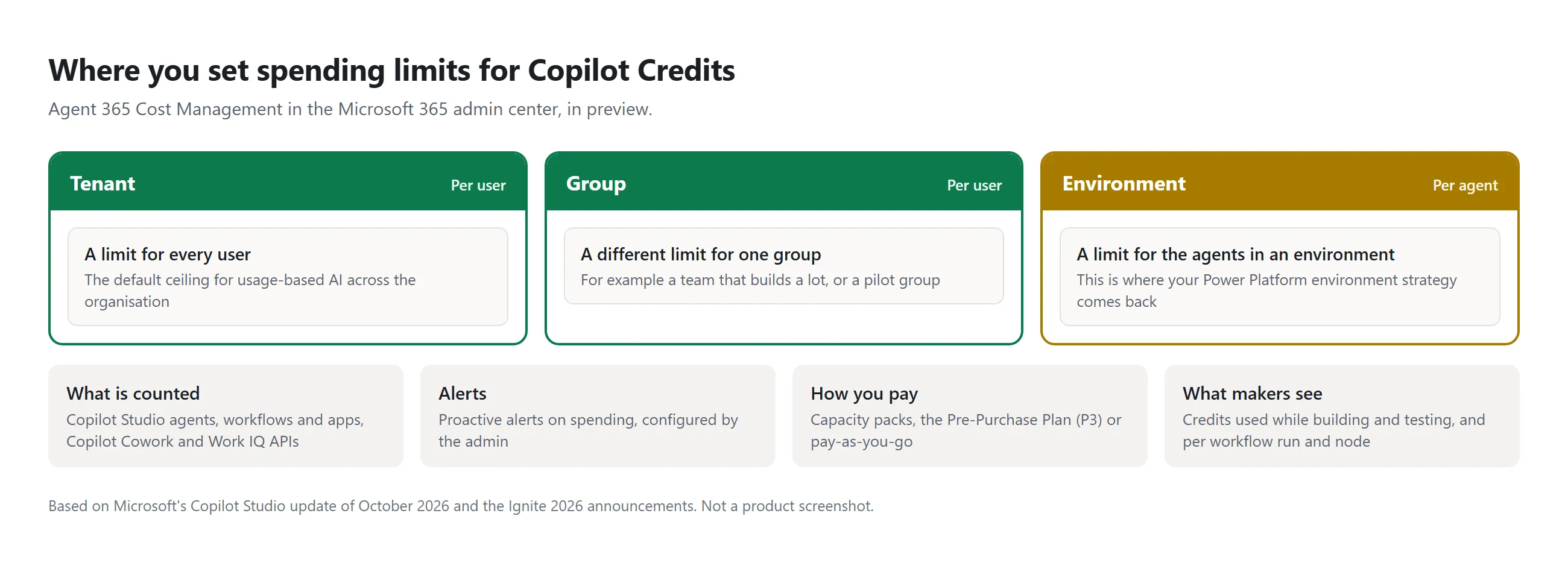
What it is. Cost Management lives in the Microsoft 365 admin center. It tracks Copilot Credits across Copilot Studio agents, workflows and apps, Cowork and Work IQ APIs. Business Analytics is a separate app for business leaders that connects spend, adoption and value.
Status. Cost Management is in preview, with forecasting in Frontier. Business Analytics is in Frontier preview.
What changes for you.
- You can set spending limits per user at tenant or group level, and per agent at environment level, with alerts.
- Makers see the credits an agent uses while they build and test, and per workflow run and node.
- Usage insights for Microsoft's own agents and agents built on Microsoft platforms no longer need an Agent 365 licence.
Read more: Copilot at Microsoft Ignite, the Business Analytics docs and the Book of News.
Entra Agent ID and MCP firewall
What it is. Agent ID gives an agent an identity in Entra. It now covers local agents found on devices, 60 types including Claude Code, OpenAI Codex and GitHub Copilot CLI. The MCP firewall enforces policies on what agents may reach over MCP: servers, tools, resources and methods.
Status. Both in preview. Lifecycle management of agent identities is generally available.
What changes for you. A default lifecycle policy disables agent identities that were inactive for 60 days. With the firewall, you can limit a coding agent to trusted MCP servers and tools.
Read more: Microsoft Entra at Ignite.
Also announced: the Copilot app
- Home and Office in Copilot are generally available. Word, Excel and PowerPoint open inside the Copilot app.
- Copilot Code builds apps, dashboards and widgets from a description. General availability is planned for December.
- Autopilot, a long-running personal agent, and Workspaces, a shared space for people and agents, are in Frontier.
- Dynamics 365 plugins for Sales, Customer Service and ERP are generally available.
Sources
- Ignite 2026 Book of News
- Ignite 2026 live blog
- Ignite 2026: Building the frontier ecosystem, Satya Nadella
- Copilot at Microsoft Ignite, Jared Spataro
- Introducing Dynamics 365 in Copilot, Jeff Teper
- Introducing the new Microsoft IQ, Azure blog
- Copilot Managed Runtime in public preview, the September background post
Published