Quickly Remove Solution Layers Without Checking Every Single Component
Remove unmanaged solution layers quickly and check the result with Solution Layers Explorer in XrmToolBox instead of opening every component.
Intro
Ever wanted to delete unmanaged layers, because you ofcourse had a good reason to add them, but want a quick way? It’s a common headache, especially when you don’t want to click through every component manually to check if the unmanaged layers are truly gone.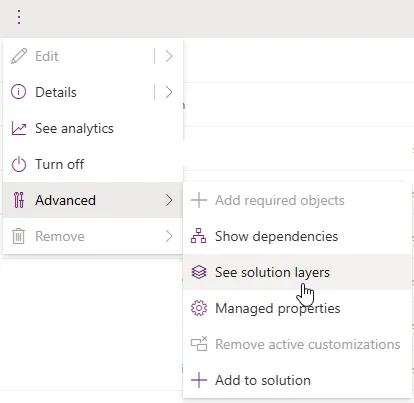
Good news: there’s a better way!
A Better Way to Double-Check: Solution Layers Explorer in XrmToolBox
Instead of opening each table, form, or view one by one, use the Solution Layers Explorer tool in XrmToolBox. This tool gives you a complete overview of all active layers across every component within that solution.
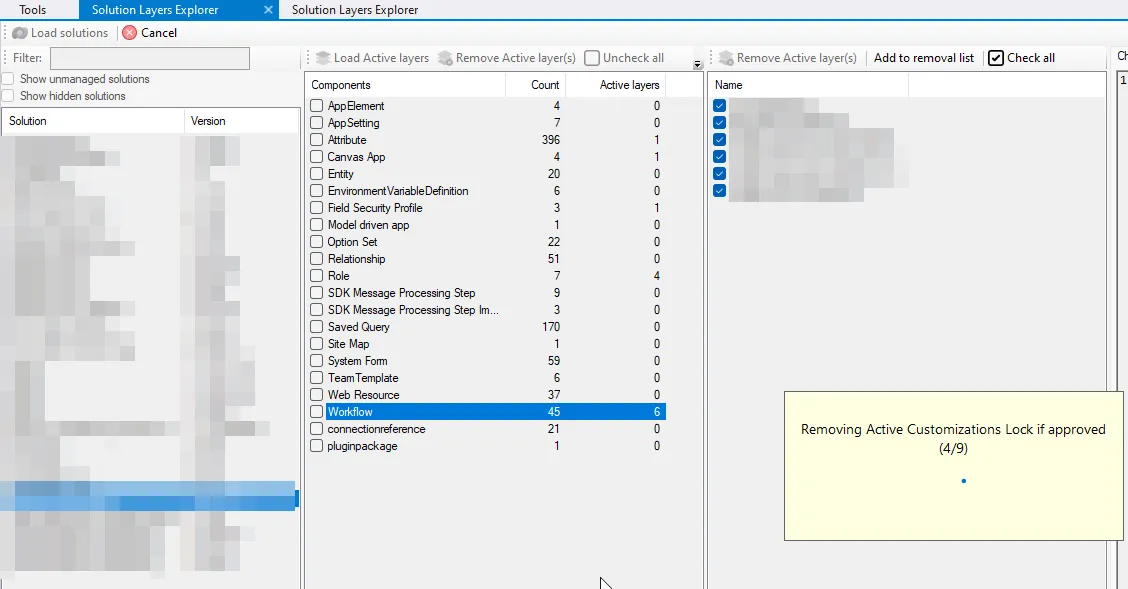
No more guesswork or time-consuming manual checks.
Big shout-out and thank you to MscrmTools for creating this tool! Check them out on:
🔗 GitHub
Why This Tool Saves You Hours
Here's what makes Solution Layers Explorer so powerful:
- Bulk visibility: Instantly see all components with custom layers, not just one at a time.
- Easy cleanup: Delete unwanted layers in bulk.
- Fast validation: After the cleanup, this tool shows if anything is still lingering.
Common Pitfalls to Avoid
- Assuming it's clean: Just because you deployed a solution doesn't mean all layers are gone.
- Skipping verification: Always check with the tool, it's quicker than being surprised later by unwanted behavior.
Published , updated